My Amazon account health rating dropped to At Risk. What do I do?
Appeal the violations you can prove were issued in error first, because a successful appeal is one of the few ways a violation stops counting. Then fix the root cause of the correct ones across your whole catalog. AHR runs from 0 to 1,000, and 100 to 199 is the At Risk band.
Key takeaways
- AHR runs from 0 to 1,000, and a score from 100 to 199 is the At Risk band.
- Amazon says violations come off through a successful appeal or a retracted IP complaint, and AHR updates within 24 to 48 hours.
- Policy warnings drop off the Account Health page after 180 days, so untouched violations keep counting until then.
- Sort every open item into wrong-with-proof, wrong-without-proof, right-and-live, and right-and-fixed before you click anything.
- A score above 200 is not a shield: Amazon can deactivate accounts independent of AHR.
If your Amazon Account Health Rating (AHR) has dropped below 200, you are in the At Risk band, and the job is to get unresolved violations off the account before more land on top of them. Start with the violations you can prove were wrong and appeal those first, then fix the root cause of the ones that were right, because those are the ones that will keep coming back.
That is the short answer. The rest of this post is how we triage an At Risk account in the first few days, in what order, and where sellers usually make it worse.
What does an AHR below 200 actually mean?
AHR runs from 0 to 1,000. According to SellerSprite’s 2026 AHR guide, 200 to 1,000 is the healthy zone, 100 to 199 is At Risk, and 0 to 99 is the bottom band. Amazon’s own labels for the three statuses, from its original AHR announcement on the Seller Forums, are Good, At Risk and Critical.
Amazon’s announcement says the rating takes into account “the number of unresolved policy violations on your account at any given time, the relative severity of those violations,” and how you affect the customer experience. Two words in that sentence matter most:
- Unresolved. A violation that has been successfully appealed stops counting. A violation sitting there untouched keeps counting.
- Severity. Not every violation weighs the same. Amazon does not publish an exact point table in any source we could check, so treat any third-party “points per violation” list as an estimate, not a rule.
Two more facts from the same announcement shape the plan:
- Violations come off through a successful appeal of an enforcement made in error, or when a rights owner retracts an intellectual property complaint.
- Once Amazon confirms a violation has been addressed, AHR updates within 24 to 48 hours. Policy warnings are removed from the Account Health page after 180 days.
Getting back to 200 is the floor, not the goal. SellerSprite recommends a buffer, targeting 500 or more, and reports that accounts below 500 can face more frequent automated audits.
And one warning that sellers skip: Amazon says accounts can be deactivated independent of AHR where there is evidence of fraud, illegal activity or risk to customers. A score above 200 is not a shield.
What should I fix first?
Sort every item on your Account Health page into one of four buckets. This takes 30 minutes and saves weeks.
| Bucket | Example | What to do | Priority |
|---|---|---|---|
| Wrong, and you can prove it | IP complaint on a product you make; restricted product flag on a listing you never created | Appeal with evidence | First |
| Wrong, but proof is in someone else’s hands | IP complaint from a rights owner on genuine goods | Contact the complainant for a retraction, and appeal in parallel | First |
| Right, and the cause is still live | Listing still carries the flagged claim; supplier still unverifiable | Fix the cause, then appeal or let it age | Second |
| Right, and already fixed | Old listing violation on a deleted ASIN | Document the fix; decide whether an appeal adds anything | Last |
The logic is simple. Successful appeals and retractions are the two ways a violation stops counting quickly. Everything you can move through those two doors should go first, because each one raises the score within days, not months.
The third bucket is the dangerous one. A violation that is correct and still live usually means more of the same is coming. One restricted-product flag on a listing often means the same issue sits on ten other listings you have not been flagged for yet. Fix the whole pattern, not just the ASIN Amazon named.
How do I triage it in the first 72 hours?
SellerSprite reports that some 2026 enforcement actions carry response windows as short as 72 hours, and recommends responding to warnings within 48 hours. Whatever the exact window on your notice, read the date on it and plan backwards. Here is the sequence we follow.
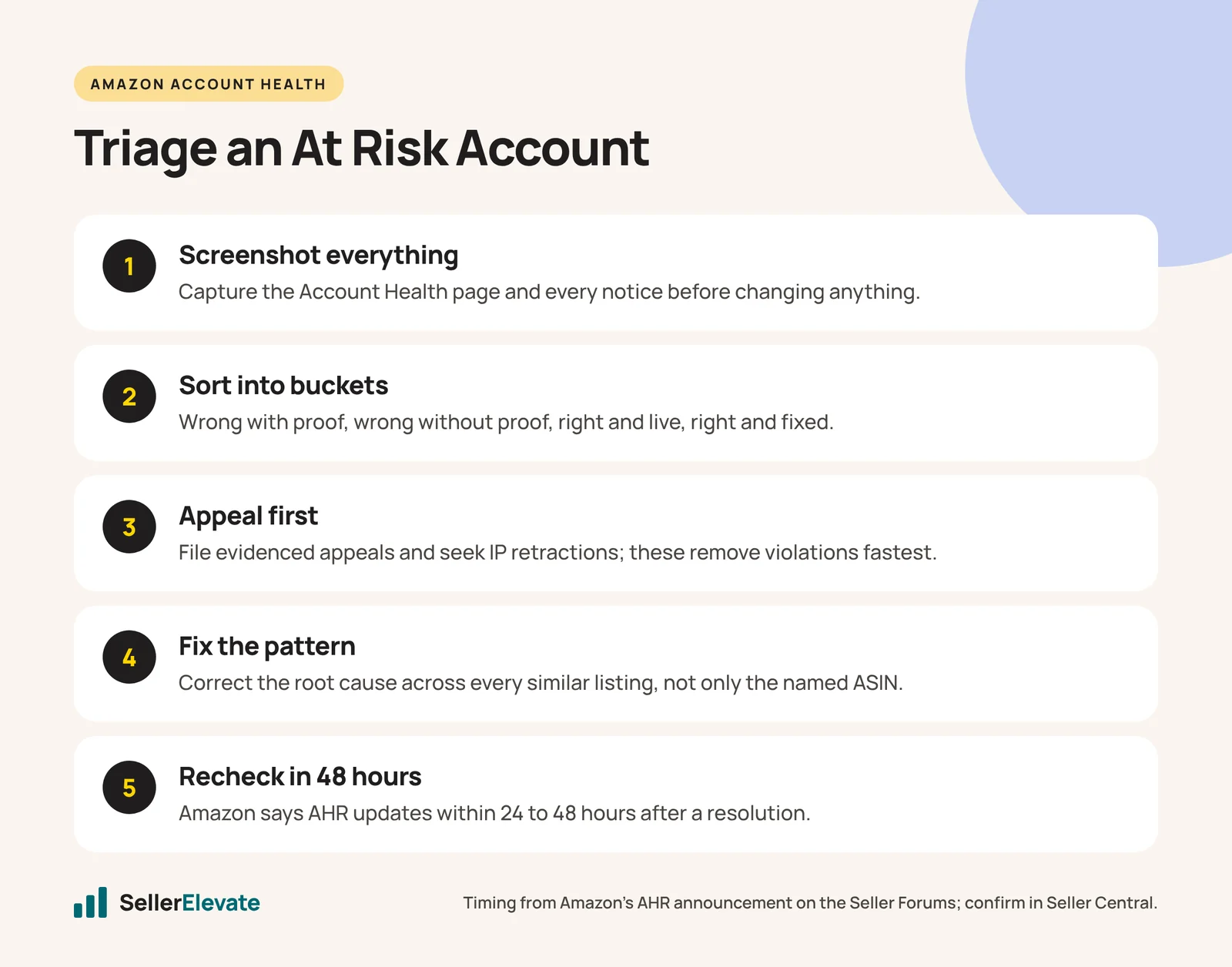
- Screenshot the Account Health page and every notification. Before you change anything. If an appeal is rejected later, you need the exact wording of what Amazon said, and pages change.
- List every open item with the ASIN, the policy named, the date, and the action Amazon took (warning, listing removed, ASIN deactivated).
- Sort into the four buckets above. Be honest. Putting a correct violation in the “wrong” bucket produces an appeal that gets rejected, and repeated weak appeals waste the time you do not have.
- Check for a pattern. Pull every active listing in the same category, with the same claim, from the same supplier. If the flagged issue exists elsewhere, fix it now, before the next flag.
- File the strong appeals first. One clear, evidenced appeal per violation. Do not bundle.
- Contact complainants for IP complaints where you have a relationship or a clear case. A retraction is cleaner than an appeal.
- Write down the fixes for bucket three, with dates. This becomes the “preventive measures” section of any plan of action you need later.
- Re-check the score 48 hours after each resolution. Amazon says updates land within 24 to 48 hours. If nothing moves after that, open a case and ask why.
If your account also carries a performance problem (late shipments, cancellations, an order defect rate creeping toward 1%), SellerSprite flags order defect rate as the most consequential metric. Those numbers sit on the same page and feed the same risk picture, so fix the operation behind them at the same time.
Which mistakes make an At Risk account worse?
Acknowledging things you should have appealed. Clicking acknowledge to make a notice go away can close the door on an appeal you could have won. We cover this in detail in acknowledge or appeal an Amazon policy warning.
Deleting the listing and thinking the violation is gone. Removing an offer can stop new harm, but the violation on your record is a separate thing. Deletion is not resolution.
Creating a new ASIN to escape a deactivated one. Forum sellers who tried this were told it loses all reviews and creates a duplicate listing problem on top of the original one.
Generic appeals. A plan of action that could have been written for any seller tends to get a templated rejection. If that is already happening, read what to do when Amazon rejects your plan of action again.
Arguing that Amazon is wrong without evidence. You may well be right. The original AHR thread is full of sellers flagged on listings they never created. Being right still needs a document attached: the listing history, the invoice, the brand authorization.
What we'd do this week
For a hypothetical account sitting at 160 with six open items, our week looks like this:
- Day 1: screenshots, the full list, the four buckets. Identify which items are appealable with evidence already in hand.
- Day 1 to 2: file the evidenced appeals. Email any IP complainant where a retraction is realistic.
- Day 2 to 3: audit the catalog for the same pattern behind every “right” violation. Fix titles, bullets, images and claims across all affected listings, not just the named ones.
- Day 3 to 5: write a short internal log of each fix and its date. Re-check the score after each resolution.
- End of week: set a fixed weekly check of Account Health, which SellerSprite also recommends. Most At Risk accounts we see got there through several small items nobody looked at for a month.
If one of the open items is an authenticity or condition complaint, the evidence standard is stricter. Our guides on which invoices work for inauthentic complaints and used sold as new complaints cover those.
When should I get help?
Handle it yourself if the violations are listing-level, you know why each happened, and you have the documents. Get help if any of these are true:
- The score is falling while you are working on it, which suggests a pattern you have not found.
- You have filed the same appeal twice and received the same templated reply.
- A notice mentions related accounts, fraud or deactivation, where the next step decides whether you keep the account.
- You cannot tell which bucket a violation belongs in.
Our account suspension and reinstatement team works on exactly this, and an account audit is how we find the pattern behind repeated flags before Amazon finds it for you. Fees, thresholds and enforcement windows change, so as of October 2026, confirm the current status bands and your notice deadlines on the Account Health page in Seller Central before acting.
Frequently asked questions
How long does it take for AHR to update after an appeal?
Amazon's announcement says that once it confirms a violation has been addressed, your AHR updates within 24 to 48 hours. If nothing changes after that window, open a case through Account Health and ask why the resolved item is still counting.
Does Amazon publish how many points each violation costs?
Not in any source we could check. Amazon says AHR weighs the number of unresolved violations and their severity. Third-party point tables exist, but treat them as estimates rather than rules, and prioritize by what you can resolve quickly.
Will deleting a listing remove the violation?
No. Deleting or closing an offer can stop further harm, but the violation on your record is separate. It stops counting through a successful appeal, a retracted IP complaint, or when the warning ages off the Account Health page after 180 days.
What is a safe AHR target?
Anything from 200 to 1,000 is healthy, but SellerSprite recommends aiming for 500 or more, and reports that accounts below 500 can face more frequent automated audits. A buffer matters because one new violation can drop you into At Risk.
Sources
Get the honest version of your numbers
A free account audit from the person who would actually run your account.