
Why did Amazon change my product title and images, and how do I stop it?
Usually Amazon's AI either rewrote a title over the 75-character limit enforced from July 27, 2026, or applied AI enrichment to other fields. Brand owners get 14 days to review title rewrites in Review Listing Changes. Anyone can overwrite changes later in Manage All Inventory, and a weekly check of top ASINs catches most problems.
Key takeaways
- Two processes cause most unwanted changes: title rewrites under the 75-character rule and AI enrichment of other listing fields.
- Brand owners have 14 days to accept, edit or reject AI title rewrites in Review Listing Changes; if nobody acts, Amazon's version goes live.
- PPC Land reported Amazon's FAQ put titles updated since June at more than 984 million.
- Any seller can overwrite AI changes in Manage All Inventory or in bulk through the Category Listings report.
- Keep a dated master copy of every listing so you have evidence when you open a case.
If Amazon changed your product title, bullets or images without you doing anything, it is usually one of two things: its AI rewrote a title that breaks the 75-character rule enforced from July 27, 2026, or its AI “enriched” your listing with content it generated or pulled from elsewhere. You cannot switch either off completely, but brand owners can review title rewrites before they go live, any seller can overwrite a change afterwards, and a weekly check catches most problems before they cost sales.
Here is how to tell which one hit you, how to find it, and how to get your version back.
Why is Amazon changing my listing?
There are two separate processes, and they need different responses.
1. Title rewrites under the 75-character rule. Amazon now caps most product titles at 75 characters, with a new 125-character Item Highlights field for the rest, according to EcomCrew. Any title still over the limit after July 27, 2026 is rewritten by Amazon’s AI, gradually and without you taking action. PPC Land reported on July 30 that Amazon’s own FAQ put the number of product titles updated since June at more than 984 million, and that implementation “will take place throughout 2026”. So if your titles have not changed yet, they may still. We cover the rule itself in the 75-character title limit and Item Highlights.
2. AI enrichment of the rest of the listing. This is older and less documented. A Seller Forums thread about “AI-generated product attribute enrichment”, posted about two years ago, describes AI “Listing Updates” suggestions that sellers had to reject one by one, “otherwise the changes are made automatically”. The thread has no reply from Amazon. A ClearAds agency article, published April 7, 2026 and updated September 9, 2026, describes the same pattern across titles, bullets, descriptions, images, categories and variation structures, and links it to an internal Amazon initiative reported in 2025 as Project Starfish.
Be careful with the Starfish numbers. ClearAds cites reporting that it affected over 900,000 seller accounts and carried an internal estimate of $7.5 billion in extra sales. Those figures come second-hand through an agency blog, and we could not check them against an Amazon source. The pattern of AI edits is well corroborated. The exact scale is not.
The two processes also collide. A title the AI shortens to 75 characters may drop the compatibility detail or size that a shopper, or Amazon’s own assistant, needs. That matters more now that Alexa for Shopping (formerly Rufus) reads your listing to decide whether to recommend you. See how to optimize a listing for Alexa for Shopping.
How do you spot an AI rewrite?
Most sellers find out from a drop in conversion, weeks later. A routine check is faster. Here is the checklist we use:
- Check Review Listing Changes. If you are brand registered, this Seller Central tool shows pending AI title and Item Highlights changes, with a “Soon to be published on” date. ZonGuru notes it needs the Brand Representative role, set under User Permissions.
- Preview suggested changes. In Manage All Inventory, open Edit on an ASIN and look for View Enhancements, which ZonGuru describes as a preview of Amazon’s AI recommendations.
- Look at the live page, not Seller Central. Open your top ASINs on the Amazon app as a shopper. Compare the title, the first five images, the bullets and the variation picker against your own master copy.
- Read Amazon’s emails. ClearAds reports notification emails about planned changes with roughly a two-week response window. They are easy to miss in a busy inbox.
- Count your child ASINs. ClearAds describes a case where 13 of 16 child ASINs were split into standalone listings without warning. A variation family that suddenly shrinks is a red flag.
- Watch category and browse node. A product moved to the wrong category can lose ranking overnight and pick up the wrong fee.
- Keep a dated copy of every listing. A flat file or spreadsheet export of your approved content, saved monthly, is your evidence when you ask for a correction.
Which fields can you protect?
Here is what we found, field by field, as of October 2026. Confirm the current tools in Seller Central, because this area changes often.
| Field | What can happen | What you can do |
|---|---|---|
| Title | Rewritten to 75 characters if longer | Brand owners: accept, edit or reject within 14 days in Review Listing Changes. Everyone: overwrite afterwards |
| Item Highlights | Filled by AI alongside the title rewrite | Same as title; write your own first |
| Bullets and description | AI enrichment suggestions applied | Reject suggestions; overwrite via Manage All Inventory or a flat file |
| Images | Replaced, per ClearAds case reports | Re-upload; open a case if it reverts |
| Variations | Children split into standalone listings | Open a catalog case; keep your parent-child file on record |
| Category | Moved | Open a case with evidence of the correct node |
On titles, the rules are clear. Brand owners “will have 14 days before these changes are implemented to review, modify, and approve” AI rewrites, per PPC Land’s reading of Amazon’s FAQ. If nobody acts, Amazon’s version goes live by default. Sellers without Brand Registry do not get that window.
On the rest, there is no single off switch that we could verify. ClearAds recommends a “Brand Catalog Lock” tied to Brand Registry. We could not find that name in Amazon’s public documentation, so ask Brand Registry support what protection is available on your account before relying on it. Brand Registry itself is a prerequisite for most of the useful protections, and our trademark registration service is where that starts if you do not have it.
How do you get your version back?
Take it in this order:
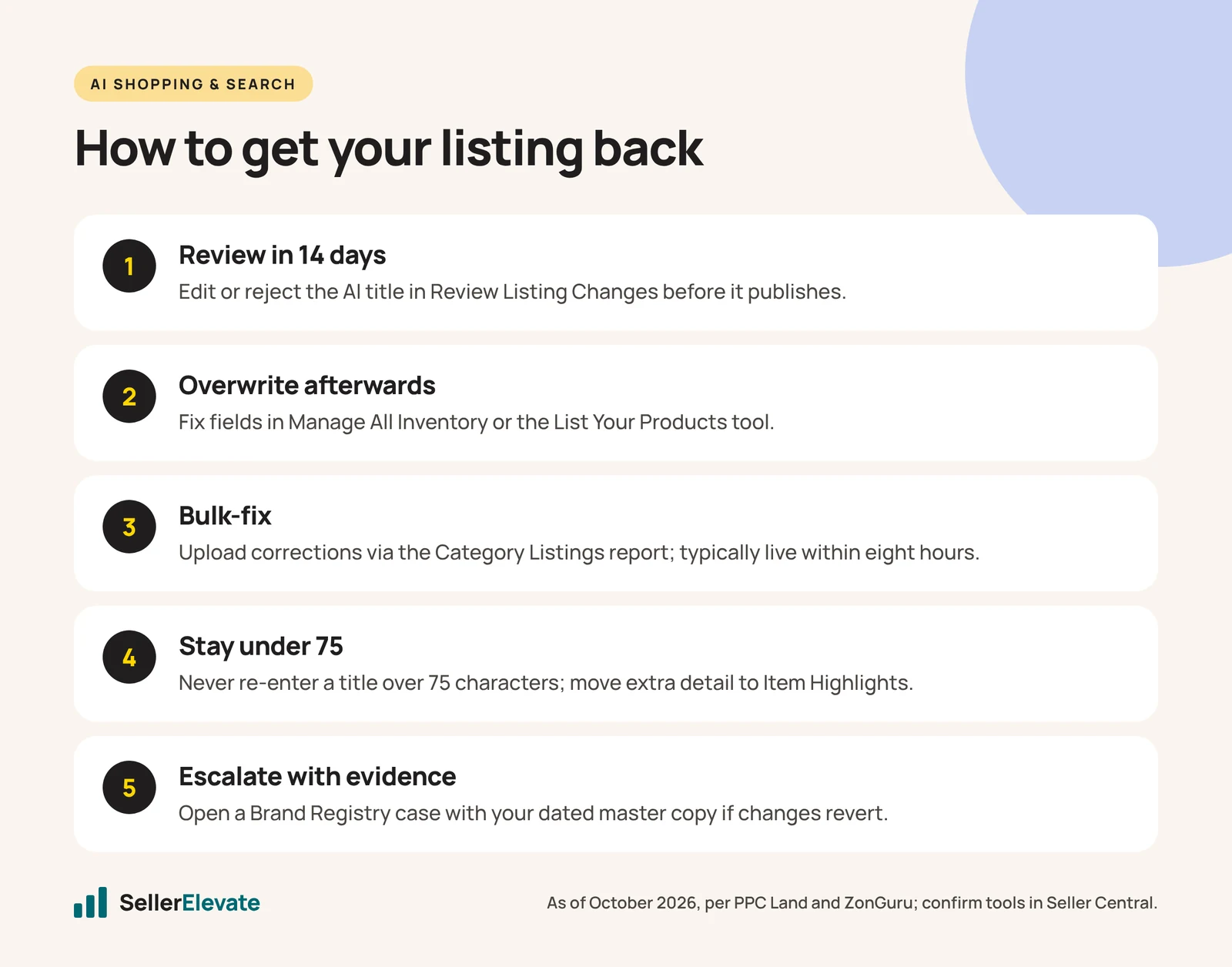
- Inside the 14-day window, edit or reject the proposed title in Review Listing Changes. This is the cleanest fix.
- After the window, overwrite the field in Manage All Inventory or the List Your Products tool. PPC Land reports you can override AI changes “at any time” this way.
- For many ASINs, upload corrections through the Category Listings report. PPC Land says listings are typically updated within eight hours.
- Do not re-enter a title over 75 characters. ZonGuru warns that an over-length title goes straight back into the rewrite queue. Rebuild it to fit, and move the extra detail into Item Highlights.
- If the change reverts or will not save, open a case through Brand Registry support. Attach your dated master copy and, where it helps, your brand website showing the same content. ClearAds suggests keeping site and listing consistent for this reason.
- For split variations or wrong categories, open a catalog case with your original parent-child file. Expect this to take longer than a text fix.
ClearAds also describes a supplement seller whose listing was removed after AI-generated content added health claims that broke Amazon policy. If you sell in a regulated category, check AI changes for compliance, not only for style. You remain responsible for what your listing says.
What we'd do this week
- Give someone on your team the Brand Representative role and have them open Review Listing Changes today.
- Export your current listing content as a dated file. This is your baseline.
- Check your top 20 ASINs by revenue on the live app against that file: title, Item Highlights, first five images, bullets, variations.
- Rewrite any title over 75 characters yourself before the AI does. Put the important details in the first 75.
- Add a weekly 15-minute check of the top 20 to someone’s calendar through Q4.
- Log every unwanted change with a date and screenshot. If the same ASIN keeps reverting, that log is what gets a case escalated.
This is unglamorous work, and it is also the kind of thing that falls through the gaps in a busy Q4. If you want it handled, it is part of our listing optimization and account management work. Our ten-minute listing audit is a good starting point if you want to do it yourself. For the wider context of Amazon’s AI changes, read Rufus is gone: what Alexa for Shopping changes.
Frequently asked questions
Can I turn off Amazon's AI listing changes completely?
Not that we could verify. Brand owners can reject AI title rewrites within the 14-day review window, and anyone can overwrite changes afterwards. ClearAds recommends a Brand Catalog Lock, but we could not find that name in Amazon's public documentation, so ask Brand Registry support what protection your account has.
Do sellers without Brand Registry get the 14-day review?
No. According to PPC Land's reading of Amazon's FAQ, the 14-day review window in Review Listing Changes is for brand owners only. Other sellers can still edit the title in Manage All Inventory afterwards, but they get no advance notice, which is one more reason to secure Brand Registry.
Can I put my old long title back after Amazon shortens it?
Not as it was. ZonGuru warns that re-entering a title over 75 characters sends it straight back into the rewrite queue. Rebuild a title that fits within 75 characters, lead with the most important details, and move the rest into the 125-character Item Highlights field.
What should I do if Amazon split my variation family?
Open a catalog case through Seller Central or Brand Registry support and attach your original parent-child file. ClearAds describes a case where 13 of 16 child ASINs were split into standalone listings. Variation fixes usually take longer than text fixes, so start as soon as you notice.
Sources
- ClearAds: Amazon’s AI is rewriting your listings without permission (Apr 7, 2026, updated Sep 9, 2026)
- Amazon Seller Forums: AI-generated product attribute enrichment thread (forum thread, about 2024)
- PPC Land: Amazon forces 14-day review window on AI-rewritten product titles (Jul 30, 2026)
- ZonGuru: Amazon AI rewrote my title (Jul 27, 2026)
- EcomCrew: Amazon will rewrite your product titles after July 27 (Jun 15, 2026)
Get the honest version of your numbers
A free account audit from the person who would actually run your account.