
How do TikTok search ads work?
TikTok search ads show your video ads on TikTok's search results page and in the feed people scroll after tapping a result. You can switch on Automatic Search Placement for existing in-feed campaigns, which needs no keywords, or run a dedicated Search Ads Campaign where you choose keywords. Negative keywords keep ads off irrelevant searches.
Key takeaways
- Automatic Search Placement extends in-feed campaigns to TikTok search results using the same creative and settings.
- A dedicated Search Ads Campaign lets you target keywords and supports Spark Ads and carousel image ads.
- TikTok reports searches up 40% year over year and 2 times higher purchase lift for campaigns using search ads, which are platform figures.
- TikTok search intent favors reviews, demos and best-for queries rather than model numbers and price checks.
- Start with search placement on a converting campaign, read the search terms report, then build keyword campaigns around proven queries.
TikTok search ads show your video ads on TikTok’s search results page when someone searches a term related to your product, and they’re worth testing for ecommerce brands whose products sell on demonstration: beauty, fashion, home, gadgets, food. Start with the automatic search placement on campaigns you already run, read the search terms report, and only build a dedicated keyword campaign once you see which queries convert.
They are not Google search ads with a different logo. The intent behind a TikTok search is different, and so are the queries worth paying for.
How do TikTok search ads work?
There are two ways in, both inside TikTok Ads Manager.
1. Automatic Search Placement (formerly the “Search Ads Toggle”). According to TikTok’s help center, this extends your existing in-feed campaigns to the search results page using the same settings and creative. Ads can appear in two spots: as thumbnails on the search results page alongside organic results, and in the video feed people scroll after tapping a result. It runs on an auction-only basis and is available globally. You don’t pick keywords; TikTok matches your ads to searches it judges relevant. You can add negative keywords to keep ads off irrelevant or brand-unsafe searches.
2. Search Ads Campaign. TikTok’s help article on the dedicated campaign describes it as using keywords to reach people searching specific terms. You manage budgets, target keywords and upload creative per campaign. It supports Spark Ads and carousel image ads, and while you can load multiple creatives per ad group, only one video displays. TikTok notes the exact ad position on the results page varies by relevancy and testing.
| Automatic Search Placement | Search Ads Campaign | |
|---|---|---|
| Setup | Switch on within an existing in-feed campaign | Separate campaign with its own keywords |
| Keyword control | None directly; negative keywords only | You choose keywords |
| Creative | Same as your in-feed ads | Spark Ads, carousel images |
| Best for | Finding out which searches you already match | Bidding deliberately on proven queries |
| Effort | Low | Higher: keyword lists, negatives, reporting |
We couldn’t verify the current keyword match types, bidding options or keyword limits for the dedicated campaign from TikTok’s documentation during research (several help pages failed to load). Check those in Ads Manager when you set it up, as of October 2026.
Does TikTok search advertising actually work?
TikTok’s own numbers are strong, with the usual caveat that they’re TikTok’s numbers. eMarketer reported in September 2025 that TikTok says searches on the platform are up 40% year over year, and that campaigns using dedicated search ads saw 2 times higher purchase lift overall, with enterprise advertisers seeing 2.2 times higher purchase lift and higher incremental ROAS.
From TikTok’s user research in the same piece: 70% found TikTok search results more engaging than other options, 75% called TikTok the go-to place for brand and product discovery, and 61% said they were more likely to take action based on TikTok search results.
Two cautions. First, these are platform-reported figures and lift studies, not independent tests. Second, eMarketer’s headline is about hesitation: US brands remain cautious because of questions over data security, content moderation and political pressure on the platform’s future in the US.
Independent data is more mixed on how much people rely on TikTok search. A February 2026 Adobe Express survey found only 4% of Gen Z prefer TikTok over Google, even though most use it to search. We break that down in is TikTok still Gen Z’s search engine?
How is TikTok search different from Google search intent?
On Google, someone searching “standing desk 60 inch walnut” is often comparing specs and prices, close to buying. On TikTok, the same person is more likely searching “standing desk setup” or “standing desk worth it,” looking for someone to show them.
That changes what you bid on:
- Worth testing on TikTok: “[product type] review,” “best [product] for [use],” “[product] worth it,” “how to use [product],” “[problem] fix,” trend and aesthetic terms (“desk setup,” “skincare routine”), and your own brand name and product names people saw in videos.
- Usually better left to Google and Amazon: model numbers, part numbers, compatibility questions, “price,” “coupon,” “near me,” and long spec strings.
And it changes the creative. A search ad on TikTok has to answer the query in the first seconds, in the format the searcher expects: a demo, a before-and-after, a quick honest review. A polished brand spot that ignores the question will look out of place among organic results.
Which brands should bid on TikTok keywords?
A quick decision guide:
- If your product sells on demonstration (looks, texture, results, setup), test search placement. This is where TikTok search is strongest.
- If you already run TikTok in-feed ads with decent conversion, switching on search placement costs little to learn from. Start there.
- If your brand name gets searched on TikTok because of creator videos, protect it. Competitors can show up on those searches.
- If your product is technical, commodity or spec-driven, TikTok search is unlikely to beat Google Shopping or Amazon PPC. Put the money there first.
- If you sell through TikTok Shop and run GMV Max, check how search inventory interacts with your Shop campaigns before adding separate spend. Our post on keeping control of GMV Max covers that setup.
How should I measure whether TikTok search ads are paying off?
Judge search placement on the same business metric you use for every other channel: cost per purchase or contribution margin after ad spend, not view counts. Then add two search-specific checks.
First, compare search against in-feed inside the same campaign. If search delivers purchases at a similar or lower cost, it’s earning its place. If it delivers cheap impressions and few sales, the matching is too loose and you need more negatives or narrower creative.
Second, watch what happens to branded demand elsewhere. TikTok search often sits early in the path: someone sees a video, searches the product on TikTok, then buys on Amazon or your site days later. For a hypothetical brand selling a $35 serum, a rise in branded Amazon searches in the weeks after turning on TikTok search is a signal worth tracking even if TikTok-attributed sales look modest. It’s not proof, but it’s the kind of halo that platform attribution won’t show you.
Set a fixed test budget and a fixed window, say two to four weeks, and decide in advance what result would make you scale, hold or stop.
What we'd do this week
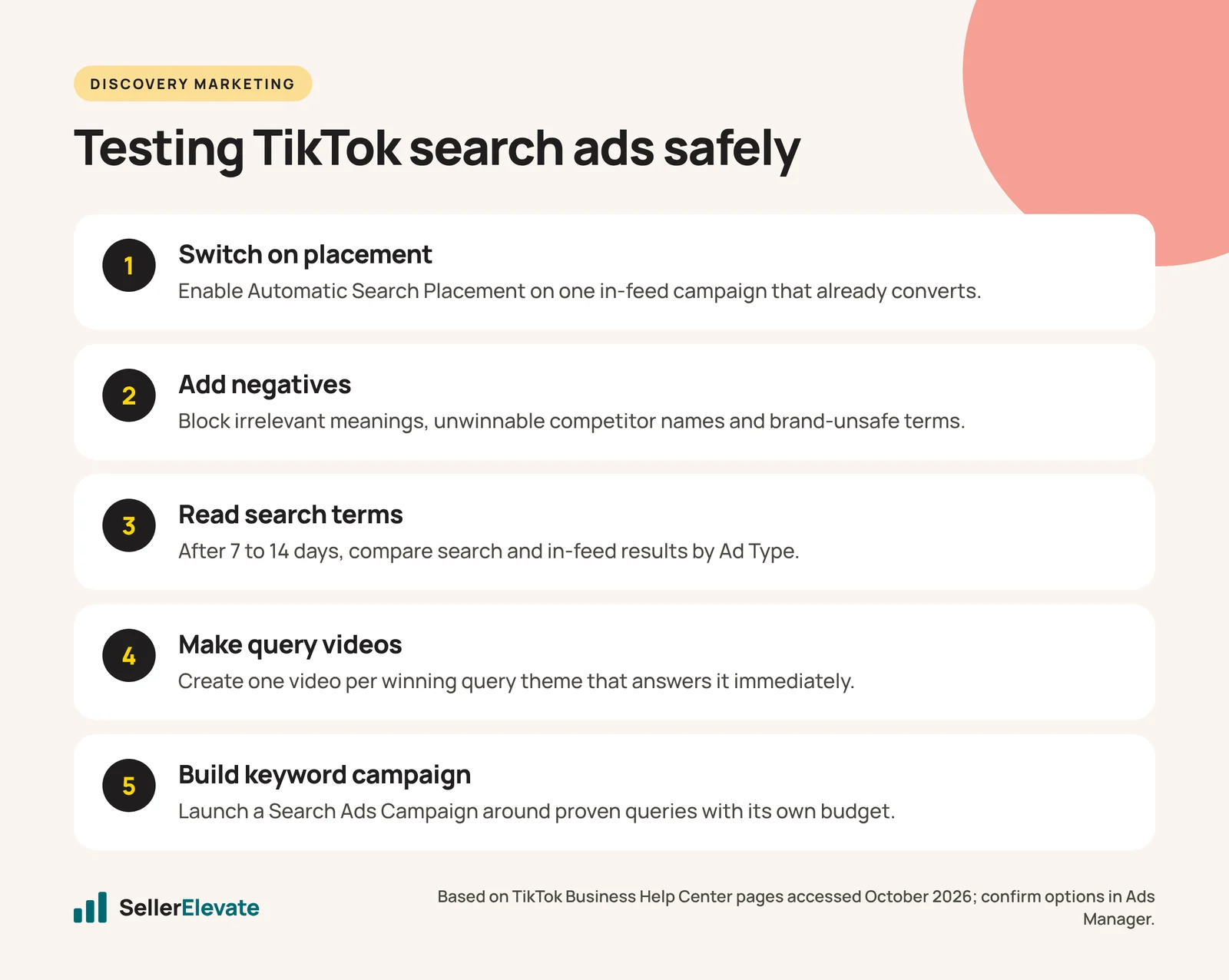
- Switch on Automatic Search Placement for one in-feed campaign that’s already converting. Don’t change anything else.
- Add a starter negative list: competitor brands you can’t win on, unrelated meanings of your product words, “free,” “DIY” if you sell finished products, and anything brand-unsafe.
- After 7 to 14 days, pull the search terms report and use a custom report with the Ad Type dimension to compare search and in-feed results, both available in Ads Manager per TikTok’s help center. Note that TikTok says not all metrics are supported for search placement.
- Sort queries into three buckets: converting (candidates for a dedicated keyword campaign), irrelevant (add as negatives), and promising but thin (keep watching).
- Make one video per winning query theme that answers the search directly in the first two seconds.
- Only then build a Search Ads Campaign around the proven queries, with its own budget so you can see its cost per purchase clearly.
The mistakes that make this worse: copying your Google keyword list into TikTok, running brand videos that don’t answer the search, skipping negatives, and judging on a few days of data.
If you want help setting up TikTok ads alongside TikTok Shop and your Amazon account, that’s what our TikTok Shop management team does.
Frequently asked questions
What is the TikTok Search Ads Toggle?
It is the older name for Automatic Search Placement. Switching it on lets ads from an existing in-feed campaign appear on TikTok search results and in the search feed, using the same settings and creative. You don't choose keywords, but you can add negative keywords and review the search terms that triggered your ads.
Can I see which searches triggered my TikTok ads?
Yes. TikTok Ads Manager provides a search terms report showing the queries that triggered your ads, and custom reports can split results by Ad Type to compare search with in-feed. TikTok notes that not all metrics are supported for search placement, so some columns may appear greyed out.
Should I bid on competitor brand names on TikTok?
Only test it carefully. Competitor searches on TikTok often come from people who already like that brand's videos, and a generic ad rarely wins them over. If you test it, use creative that answers a clear comparison question and add competitor terms as negatives where results stay weak.
Are TikTok search ads worth it for small brands?
They can be if your product sells on demonstration and you already run converting in-feed ads, because Automatic Search Placement adds little setup work. Set a fixed test budget and a two to four week window, and judge on cost per purchase, not views.
Sources
- eMarketer: TikTok’s search ads drive action, but concerns linger for US brands (September 11, 2025)
- TikTok Business Help Center: About Automatic Search Placement (accessed October 2026)
- TikTok Business Help Center: About Search Ads Campaign (accessed October 2026)
- Search Engine Journal: Gen Z preference for TikTok over Google drops 50%, data shows (February 25, 2026)
Get the honest version of your numbers
A free account audit from the person who would actually run your account.