Amazon says my product is hazmat but it isn't. How do I fix it?
Find the listing word, image or attribute that triggered the dangerous goods review, correct it, then upload the right document. For a genuinely non-hazardous product that is usually Amazon's exemption sheet, not a Safety Data Sheet. Fix the listing first, upload once against the ASIN, and open a case only if nothing moves.
Key takeaways
- The dangerous goods review is largely automated, so a single word like 'allergic' or a wrong battery field can trigger it.
- An SDS is for products that contain hazardous substances; a non-hazardous product needs an exemption sheet instead.
- A valid SDS follows the 16-section GHS format, and Section 14 transport information matters most for this review.
- Fix the listing data before uploading documents, or the next automated pass can flag the product again.
- Plan around the stranded stock, because Amazon does not publish a reliable review time.
If Amazon has flagged a product as dangerous goods and it is not, the fix is almost always the same: find the word, image or attribute that triggered the review, correct it, and submit the right document. For a genuinely non-hazardous product that is usually an exemption sheet, not a Safety Data Sheet (SDS). Resubmitting the same paperwork to the same automated queue, which is what most sellers do first, rarely changes anything.
This post covers how the review gets triggered, how to tell which document you need, what a submission that passes looks like, and what to do when it keeps bouncing.
Why does Amazon think my product is hazmat?
The dangerous goods (DG) review is largely automated. Amazon scans your listing data (title, bullets, description, attributes, images and sometimes the category itself) for signals that a product might contain something regulated for transport or storage: batteries, aerosols, flammable liquids, corrosives, pressurized containers, certain chemicals. When enough signals line up, the ASIN goes into review and, for FBA, the inventory can be blocked or stranded until the review clears.
The trigger is often something a human would never read as dangerous. In one Amazon Seller Forums thread, a seller’s top clothing ASIN was suppressed for several days and classified as hazardous. Support sent the same templated reply each time: update the product information and upload an SDS or exemption form. No explanation. Other sellers in the thread did the detective work instead. One spotted that the listing called the fabric cashmere in one place and cotton in another, and that a comparison image used the word “allergic.” Either of those can push a listing into review.
Common triggers we see in practice:
- Words that sound chemical or medical: “allergic,” “antibacterial,” “fire retardant,” “spray,” “gel,” “oil,” “solvent,” “lithium.”
- Battery fields filled in by mistake, or left blank on a product that ships with a battery.
- Inconsistent material claims (the listing says one fiber in the title and another in the bullets).
- Category templates that default to DG-sensitive attributes.
- A competitor or merged variation adding data to a shared ASIN.
SDS or exemption sheet: which one do you need?
This is where most rejections start. The two documents do different jobs.
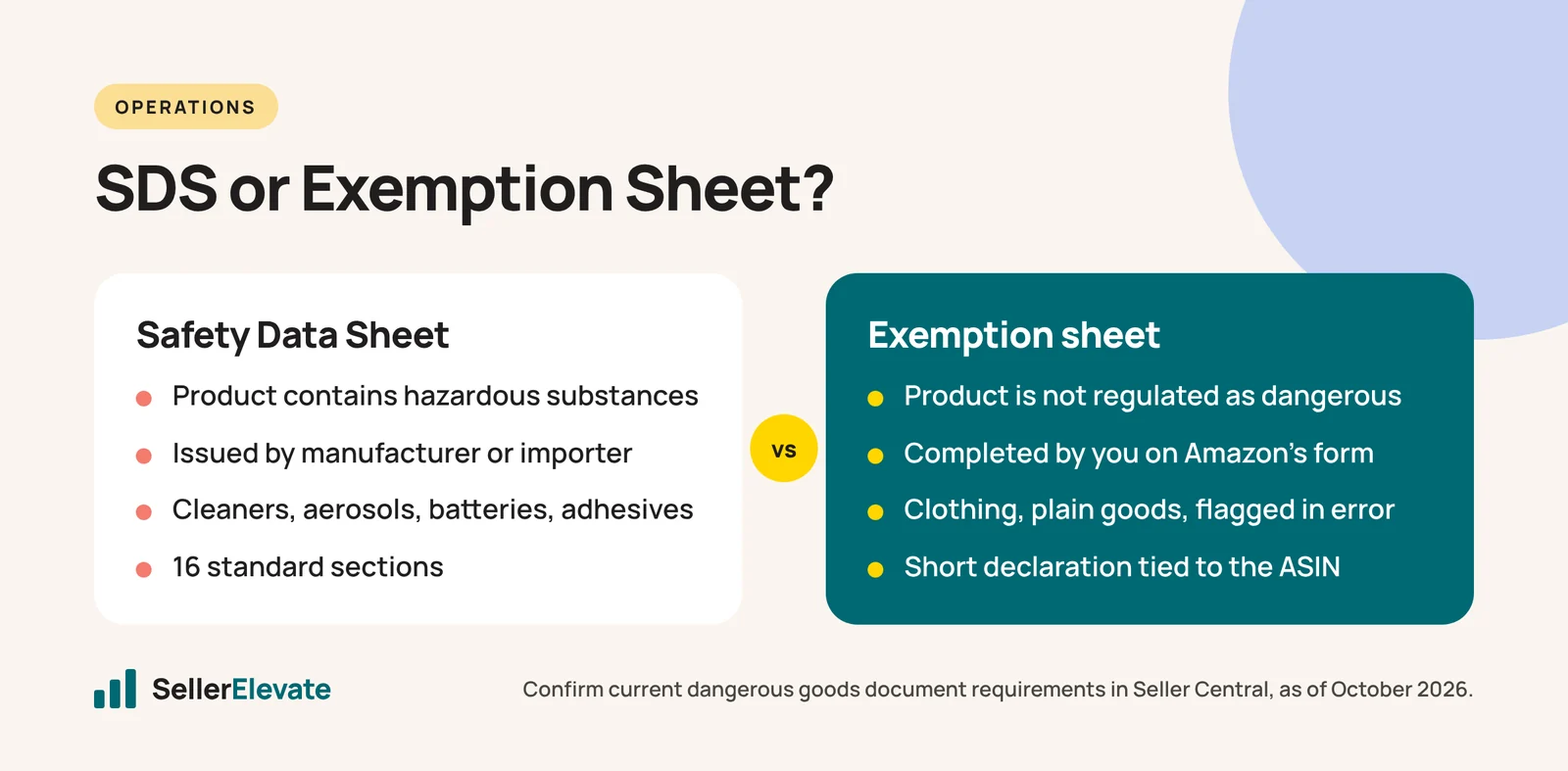
| Safety Data Sheet (SDS) | Exemption sheet | |
|---|---|---|
| What it says | The product contains hazardous substances, and here is how to handle them | The product is not regulated as dangerous goods, and here is why |
| Who produces it | The manufacturer or importer of the chemical product | You, usually on Amazon’s own form or template |
| Typical products | Cleaners, cosmetics with alcohol, aerosols, batteries, adhesives | Clothing, plain plastic or metal goods, most textiles, products flagged in error |
| Format | 16 standard sections | Short declaration tied to the specific ASIN |
As one experienced seller put it in that same thread, an SDS only exists for products that are genuinely hazardous. If your product is a sweater, there is no real SDS to send, and a “made up” one will either be rejected or, worse, confirm the hazmat classification. The right move is to download the exemption form from the link in Amazon’s notice, fill it in for that ASIN, and upload it.
If your product does contain a regulated substance (a hand cream with alcohol, a device with a lithium cell), you do need a real SDS from your manufacturer, and the goal changes from “prove it is not hazmat” to “get it classified correctly so it can be stored and shipped.”
What does a submission that passes look like?
For an SDS, the US Occupational Safety and Health Administration (OSHA) requires chemical manufacturers and importers to prepare safety data sheets in a specified 16-section format, aligned with the Globally Harmonized System (GHS). The sections run in a fixed order, from 1 Identification and 2 Hazards Identification through 14 Transport Information and 16 Other Information (Wikipedia: Safety data sheet).
That order matters more than it should. In a second forum thread, a seller had an SDS rejected more than eight times with the message “We could not find a SDS uploaded for the product,” even though they had uploaded it repeatedly. Others in the thread pointed to two likely causes: a supplier SDS with sections 2 and 3 swapped, and a product name on the SDS that did not match the listing title.
Use this checklist before you upload anything:
- Product name matches. The name on the SDS or exemption sheet should match the listing closely enough that a reviewer, or a parser, can tie them together. Add the ASIN or model number where the form allows.
- All 16 sections, in GHS order. If your supplier’s SDS is in an older or local format, ask them to reissue it in the standard layout.
- Section 14 is complete. Transport information (UN number, shipping name, class, or a clear “not regulated”) is the part the DG review cares about most.
- Dated and current. Older MSDS-style documents are a common rejection reason.
- Readable, text-based PDF. Not a phone photo, not a scan with the edges cut off.
- Listing data agrees with the document. If the SDS says no battery, the battery fields on the listing must say the same.
For an exemption sheet, the bar is simpler: the correct ASIN, an accurate description of the materials, a clear statement of why the product is not regulated, and the same facts reflected in your listing.
How do I get the classification reversed?
Work in this order. Changing the order is how sellers lose weeks.
- Fix the listing first. Remove or correct the trigger words, fix contradictory material claims, and correct battery and liquid attributes. If you upload a perfect exemption sheet while the listing still says “anti-allergic spray-treated,” the next automated pass can flag it again.
- Wait for the listing update to process. Check that the changes actually show on the detail page and in the attribute fields.
- Upload the right document through the link in the notice or the hazmat document upload page in Seller Central, against the specific ASIN.
- Open a case only if nothing moves. Reference the ASIN, what you changed, the date you uploaded, and ask specifically for a dangerous goods classification review, not a generic listing review.
- Keep a log. Date, document version, case ID and the exact reply. If you need to escalate, a clean timeline is what gets a human to read it.
How long does it take? Honestly, nobody outside Amazon can give you a reliable number. One seller in the clothing thread described it as “anything from a few minutes to a few years,” which is a joke with some truth in it. We could not find a current official review time published by Amazon, so we would not plan around one. Plan around the stock instead.
What happens to the FBA inventory while this drags on?
A DG hold on an FBA product usually shows up as stranded or blocked inventory, and storage fees keep running while it sits. If the review is clearly going to take a while, compare the cost of waiting with the cost of a removal order, especially going into Q4 when storage rates are at their highest. We cover that decision in detail in our guide to stranded FBA inventory.
Mistakes that make it worse:
- Sending a supplier SDS for a product that is not hazardous. You are telling Amazon it is hazardous.
- Creating a new ASIN for the same product. It carries the same data and gets flagged again, and it can look like an attempt to get around a review.
- Uploading different documents every few days. Each new upload can restart the queue.
- Ignoring other compliance flags. A product caught in a pesticide or children’s product review needs that issue solved too. See our posts on a product flagged as a pesticide and rejected Children’s Product Certificates.
What we'd do this week
If this was one of our accounts, here is the order of work.
- Pull the exact wording of the notice and list every ASIN affected.
- Read each listing line by line as a machine would: every chemical, medical or battery word, every material claim, every image with text. Fix them.
- Decide per ASIN: exemption sheet (not hazardous) or real SDS (contains a regulated substance). Request a GHS-format SDS from the supplier only for the second group.
- Upload once, correctly, and log it.
- Check stranded inventory daily and set a date (we use 14 days) after which we decide on removal versus waiting.
Most false hazmat flags trace back to listing content, which is why this sits inside our listing optimization work rather than being treated as a one-off support ticket. If you are dealing with a run of these across a catalog, our account management team handles the case work and the listing fixes together.
Policies and document requirements change. As of October 2026, confirm the current dangerous goods requirements in Seller Central before you submit.
Frequently asked questions
Can I create a new ASIN to get around a hazmat flag?
No. A new ASIN for the same product carries the same data and is likely to be flagged again, and it can look like an attempt to get around a review. Fix the listing content and submit the correct document against the original ASIN instead.
My supplier's SDS keeps getting rejected. What is usually wrong?
Usually format or matching. Sellers report rejections when sections are out of GHS order, when the product name on the SDS does not match the listing, or when the document is an old MSDS-style sheet. Ask the supplier for a current, text-based SDS in the standard 16-section layout.
Does a hazmat flag affect my FBA inventory?
Often, yes. Units under a dangerous goods hold can be blocked or show as stranded, and storage fees keep running while they wait. If the review is dragging on with no clear end date, compare the cost of waiting with the cost of a removal order, especially in Q4.
Should I send an SDS for clothing?
No. An SDS describes hazardous substances, so a real one does not exist for an ordinary garment, and submitting one can confirm the hazmat classification. Use the exemption form linked in Amazon's notice and make sure the listing's material claims are consistent.
Sources
- Amazon Seller Forums: Clothing incorrectly identified as hazardous (undated, accessed October 2026)
- Amazon Seller Forums: Amazon not accepting SDS (undated, accessed October 2026)
- OSHA: Hazard Communication (accessed October 2026)
- Wikipedia: Safety data sheet (accessed October 2026)
Get the honest version of your numbers
A free account audit from the person who would actually run your account.