How do I sell my Shopify products on ChatGPT and Gemini?
Use Shopify's Agentic Storefronts, which is on by default for eligible stores and sends products to ChatGPT, Gemini, Copilot and Google AI Mode through Shopify Catalog. Manage it under Sales channels > Agentic in your admin. ChatGPT sends shoppers to your store; Google, Copilot and Meta can offer direct checkout if you turn it on.
Key takeaways
- Shopify launched Agentic Storefronts on March 24, 2026, and it is active by default for eligible stores.
- ChatGPT is discovery only, so buyers check out on your store, while Google AI Mode, Gemini, Copilot and Meta can offer direct checkout if you enable it.
- Being visible is not the same as being recommended; titles, variant names, attributes and availability decide how AI assistants match your products.
- Shopify said AI-driven traffic and orders tripled year on year in Q2 2026, and about half of AI-referred sessions land on product pages.
- Brands not on Shopify can use the Agentic plan to list in Shopify Catalog while keeping their existing store.
If you are an eligible Shopify merchant, you may already be selling in ChatGPT, Gemini and Microsoft Copilot: Shopify’s Agentic Storefronts is on by default and sends your products to those AI channels through Shopify Catalog. You manage it under Sales channels > Agentic in your Shopify admin, and the real work is fixing your product data so the AI assistants describe and recommend your products correctly.
Shopify launched Agentic Storefronts on March 24, 2026. Here is what it does, how to set it up, and what to fix first.
What is Shopify Agentic Storefronts?
It is one place in Shopify admin to manage how your products appear in AI assistants. Shopify’s announcement (March 24, 2026) lists ChatGPT, Microsoft Copilot, AI Mode in Google Search and the Gemini app, with Meta experiences coming. Shopify’s help center now lists Meta (including Muse) as a channel too. According to Shopify, products are discoverable by default, with no separate apps or integrations and no transaction fees beyond your standard processing rates.
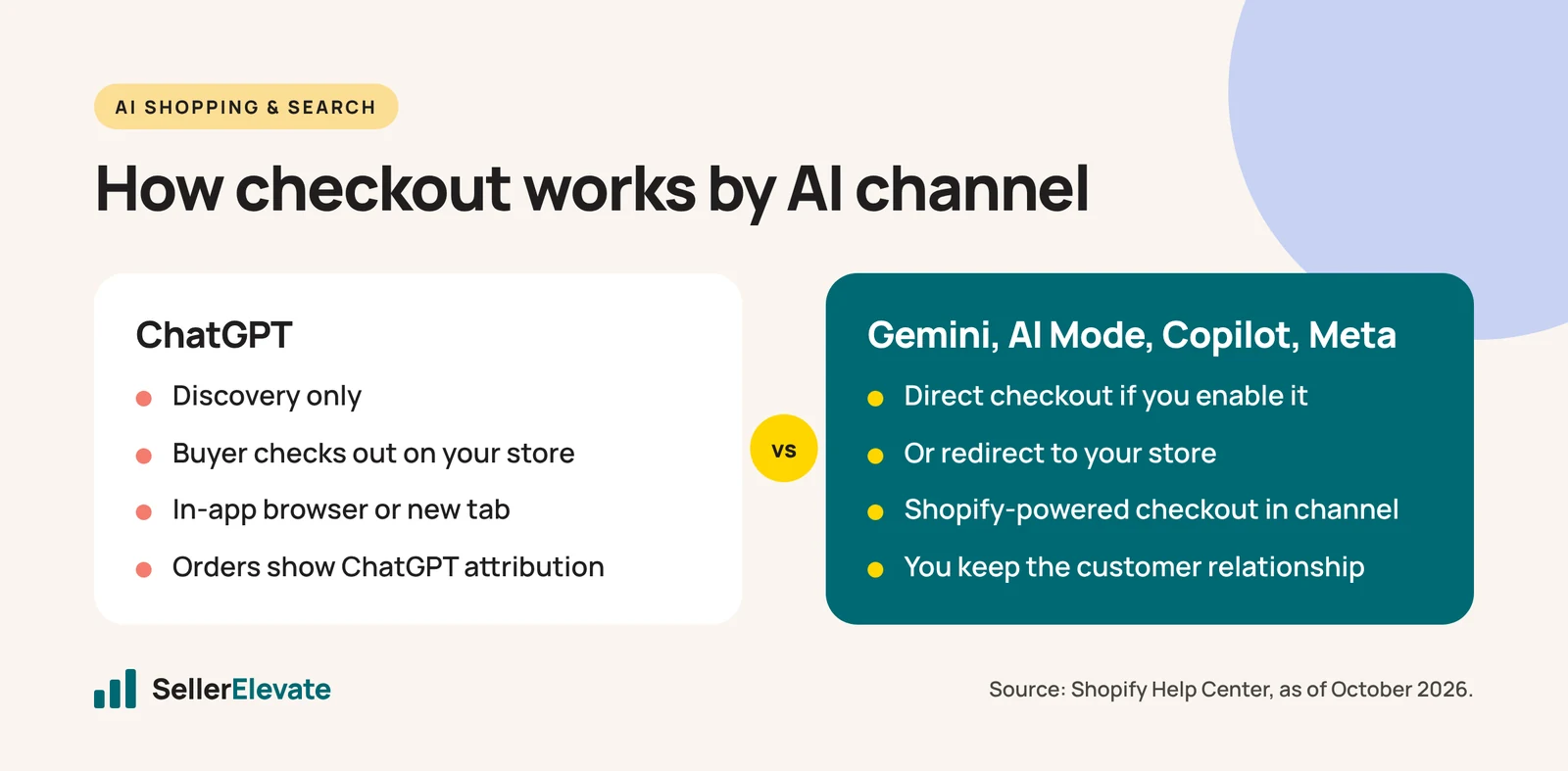
How checkout works depends on the channel, according to the Shopify Help Center:
| Channel | How the sale completes |
|---|---|
| ChatGPT | Discovery only. The shopper buys on your store, in ChatGPT’s in-app browser or a new tab |
| Google AI Mode and Gemini | Shopify-powered direct checkout inside the channel, if you turn it on |
| Microsoft Copilot | Direct checkout inside the channel, if you turn it on |
| Meta | Direct checkout inside the channel, if you turn it on |
The ChatGPT row reflects OpenAI’s decision in March to stop in-chat checkout and focus on discovery. We cover that change, and what it means for your feed, in how to get your products recommended by ChatGPT.
In every case, Shopify says you keep ownership of the customer relationship and the post-purchase experience, and orders show channel attribution in your admin. In Shopify’s words, “Orders flow into the admin with ChatGPT referral attribution, so merchants can see exactly where sales came from.”
How do I set up Agentic Storefronts?
Because it is on by default, setup is mostly checking and tidying. This is the order we would follow.
- Find the channel. Go to Sales channels > Agentic in your Shopify admin. If you don’t see it, your store may not be eligible yet. The US launch covered eligible US merchants by default. One setup guide (eCommerce Fastlane, updated April 14, 2026) suggests registering at shopify.com/chatgpt to be told when access opens.
- Accept the terms. Shopify requires you to accept the Agentic Storefronts Supplemental Terms of Service. Read them; they cover how each channel can use your product data.
- Choose your channels. Turn each AI channel on or off individually. If you sell regulated or age-restricted products, check each channel’s policies first.
- Decide on direct checkout per channel. For Google AI Mode, Gemini, Copilot and Meta, you choose between direct checkout inside the channel and sending shoppers to your store. The same guide recommends starting with redirect to your store. We agree for most brands: you keep your upsells, your email capture and your own conversion data while you learn how the channel behaves.
- Check Google separately. Shopify’s help page says Google surfaces can also pull products through the Google & YouTube sales channel and Google Merchant Center. If you already run Google Shopping, make sure the two sources agree. We cover the Google side in selling in Google AI Mode.
- Confirm attribution. Place a test order or check recent orders for the AI channel attribution. If you use outside analytics, confirm referral and UTM data come through.
- Exclude what shouldn’t be there. Remove discontinued products, wholesale-only SKUs and anything you don’t want an AI assistant recommending.
A note on fees. The eCommerce Fastlane guide, written in April, lists a 4% OpenAI commission with a 30-day free trial. That appears to date from the Instant Checkout model. Shopify’s help center now describes ChatGPT as a discovery referrer with checkout on your own store, and Shopify’s announcement says there are no transaction fees beyond standard processing. We could not find a current OpenAI fee for referred orders. Check the terms in your admin before you assume either way.
What should I fix in my product data first?
Agentic Storefronts makes you visible. It does not make you recommended. Shopify’s president Harley Finkelstein explained the difference on the Q2 call: “AI agents make multiple calls into catalogs using structured data to match products with buyer intent, rather than just keywords,” as reported by Stellagent (August 6, 2026).
Structured data means your product fields. These are the ones we fix first:
- Titles. Product type, then the attribute people filter on (size, material, compatibility), then the brand. “Women’s Merino Wool Running Socks, Cushioned, 3 Pairs” beats “The Cloud Sock.”
- Variant names. “Midnight Black” and “Black” are different to a machine. Name variants clearly and consistently, and make sure every variant has its own image and stock status.
- Descriptions. Lead with what it is and who it is for, then the specs. Avoid marketing language that can’t be checked, such as “best ever” or “revolutionary.”
- Product attributes and metafields. Fill in material, dimensions, care instructions, certifications and contents wherever your theme and category allow.
- Availability. Keep inventory accurate. Write pre-order or backorder timing in plain language in the description.
- Policies. Shipping times, return conditions and warranty terms should be clear and easy to find. AI assistants answer “can I return this?” questions.
- Consistency with Amazon. If you also sell on Amazon, the facts should match. Contradictions between your Shopify listing, your Amazon listing and your reviews make it harder for any assistant to recommend you with confidence.
If this work sounds like Amazon listing optimization, that is because it is. The skills carry over. Our listing optimization work on Amazon follows the same rules: answer the shopper’s question clearly, in the order they ask it.
Is the AI channel big enough to bother with?
It is growing quickly from a small base. At Shopify’s Q2 results on August 5, 2026, the company said AI-driven traffic and orders had tripled year on year, according to Stellagent’s write-up. Some of the detail is useful for planning:
- About half of AI-referred sessions land directly on product pages, not your homepage.
- 75% of AI-attributed purchases came from outside the top 100 product categories, so niche products get found.
- Traditional search still accounts for roughly one third of storefront sessions. Finkelstein called AI “a complement to search, rather than a substitute for it.”
The second point is the encouraging one for smaller brands. AI assistants don’t only recommend the category leaders. The first point is the warning: if half of AI visitors arrive on a product page, that page has to do the selling on its own. We look at whether those visitors actually buy in does AI traffic convert.
What if my store isn't on Shopify?
Shopify also launched an Agentic plan. It lets brands that don’t use Shopify for their store add products to Shopify Catalog and reach shoppers across AI channels and the Shop app. According to Shopify’s help center, it runs alongside your existing store, and direct checkout is off by default, so buyers are sent back to your site. We did not find public pricing for the plan in Shopify’s announcement; check Shopify’s site for the current terms.
For WooCommerce, BigCommerce or custom-built stores, this may be quicker than building and maintaining separate feeds for each AI platform. The alternative for ChatGPT is applying for direct feed access with OpenAI.
What we'd do this week
- Open Sales channels > Agentic, accept the terms and review which channels are on.
- Set every channel that allows it to redirect to your store for now.
- Pick your ten best-selling products and fix titles, variant names, descriptions and attributes using the list above.
- Ask ChatGPT, Gemini and Copilot the questions your customers ask, and record whether and how your products appear.
- Check back in 30 days: AI-attributed orders, their conversion rate against your store average, and which products get surfaced.
If you sell on both Amazon and Shopify and want both sets of listings reviewed together, start with our free audit.
All details are as of October 2026. Confirm eligibility, channels and terms in your Shopify admin before you change anything.
Frequently asked questions
Does Shopify charge extra for Agentic Storefronts?
Shopify's March 2026 announcement says there are no transaction fees beyond standard processing rates. An April setup guide lists a 4% OpenAI commission, which appears to date from the Instant Checkout model that OpenAI wound down. ChatGPT now sends buyers to your store. Check the supplemental terms in your admin for current fees.
Can I turn off ChatGPT but keep Google AI Mode?
Yes. Agentic Storefronts lets you manage AI channels individually under Sales channels > Agentic in your Shopify admin. You can switch off any channel you do not want, and for channels that support direct checkout you can choose between checkout inside the channel and redirecting shoppers to your own store.
Will I own the customer if they buy through Gemini or Copilot?
Yes. Shopify says merchants keep full ownership of the customer relationship and post-purchase experience, and orders appear in your admin with channel attribution. If you want your own upsells and email capture, set channels to redirect shoppers to your store instead of using direct checkout.
Is Agentic Storefronts available outside the US?
The March 2026 launch covered eligible US merchants by default. If you do not see the Agentic section under Sales channels, your store may not be eligible yet. One setup guide suggests registering at shopify.com/chatgpt to be notified. Check Shopify's help center for current regional availability.
Sources
- Shopify: Agentic commerce momentum (March 24, 2026)
- Shopify Help Center: Agentic storefronts (accessed October 2026)
- eCommerce Fastlane: Shopify Agentic Storefronts setup guide (updated April 14, 2026)
- Stellagent: Shopify Q2 2026 AI search traffic 3x (August 6, 2026)
Get the honest version of your numbers
A free account audit from the person who would actually run your account.