Why was my TikTok Shop product listing rejected?
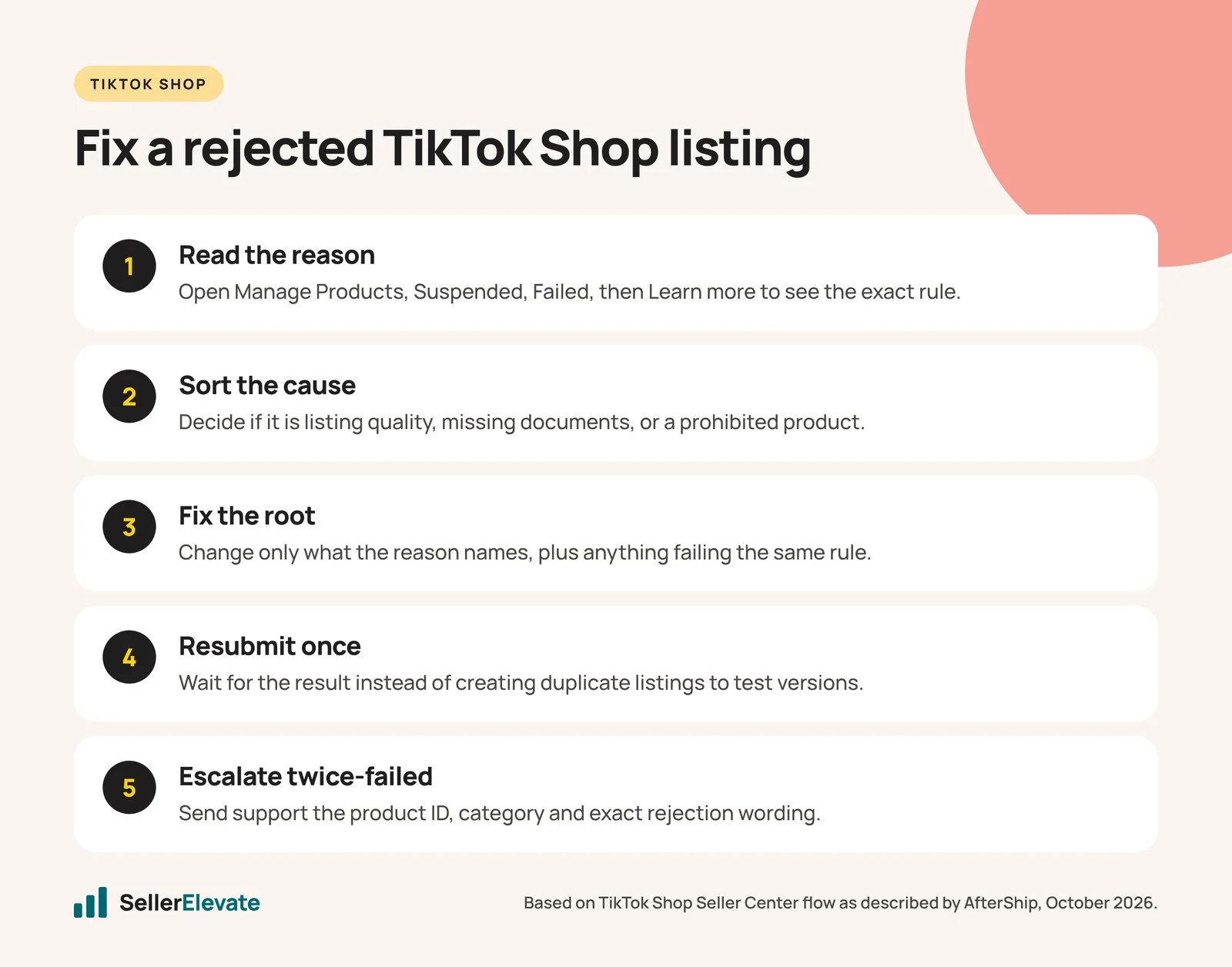
Your listing failed one of three checks: a listing-quality issue such as missing attributes, links in images or misleading claims; a missing category qualification or brand authorization; or a prohibited product. Read the exact reason under Products > Manage Products > Suspended > Failed, fix only what it names, and resubmit once.
Key takeaways
- The rejection reason in Seller Center tells you which policy you failed, so log it before editing anything.
- Redirecting traffic rejections come from links, QR codes, emails and social handles in images or copy.
- Restricted products need approved documents before resubmitting; prohibited products cannot be fixed with edits.
- Resubmitting the same listing with cosmetic changes adds rejections without solving the cause.
Your TikTok Shop listing was rejected for one of three kinds of reason: a listing-quality problem you can fix in minutes, a missing qualification document you can fix in days, or a product TikTok does not allow at all. Read the exact rejection reason in Seller Center first, decide which of the three you are dealing with, and only then edit, because resubmitting the wrong fix is how one rejection turns into five.
Most of the sellers we talk to treat a rejection as random. It almost never is. The review system is checking your listing against three published documents (the Product Listing Policy, the Prohibited Products Policy and the Restricted Products Policy), and the rejection message usually tells you which one you failed. The trouble is that the message is short, and people skim it.
Where do you find the actual rejection reason?
Start in Seller Center, not in your email. AfterShip’s support article on failed product reviews walks through the path:
- Go to Products > Manage Products.
- Open the Suspended tab, then Failed.
- Select the product and click Learn more to see the specific requirement it missed.
- Click Edit, change only what the reason points to, and resubmit.
Copy the rejection wording into a spreadsheet with the product ID, the date and the category. If you end up contacting support, they will ask for exactly those three things plus the wording, and having a log also shows you patterns. Ten rejections that all say “redirecting traffic” is one problem in your image template, not ten problems.
Which rejection reasons can you fix, and how?
Here is how we group the common reasons. The left column is what the rejection usually says or implies; the right columns tell you what kind of fix it needs.
| Rejection reason | Group | Typical fix | Realistic time |
|---|---|---|---|
| Incomplete or wrong attributes | Listing quality | Fill every required attribute for the category; check size, material, net content | Minutes |
| Category mismatch | Listing quality | Move the product to the category that matches what it is, not where it sells best | Minutes |
| Misleading images or claims | Listing quality | Remove claims you cannot prove; replace edited or stock images with real product photos | Hours |
| Redirecting traffic | Listing quality | Strip links, QR codes, emails, social handles and “buy on our site” text from images and copy | Hours |
| Duplicate or low-quality content | Listing quality | Merge variants into one listing; rewrite copied titles and descriptions | Hours |
| Pricing presentation | Listing quality | Remove prices, “50% off” banners and price comparisons baked into images | Minutes |
| Category qualification missing | Documentation | Apply in the Qualification Center with invoices, certificates and product photos | Days |
| Brand authorization missing | Documentation | Upload trademark proof or an authorization letter from the brand owner | Days to weeks |
| Restricted product | Documentation or invite | Meet the documentation rules or get invited into the category | Weeks, sometimes never |
| Prohibited product | Not fixable | Remove it from your TikTok catalog | Not applicable |
Hustle Got Real’s rejection FAQ lists the same listing-level causes: incomplete attributes, misleading images or claims, category mismatches, duplicate or low-quality content, pricing presentation and policy-sensitive products. Its most useful line is a warning: do not keep resubmitting the same listing with cosmetic changes if the underlying category may be restricted or prohibited.
Why does "redirecting traffic" catch so many sellers?
Because most catalogs were built for somewhere else. A seller who already sells on Shopify or Amazon imports images that were designed to push people to a website, a newsletter or a WhatsApp number. On TikTok Shop, anything that encourages a buyer to leave the platform is a violation.
AfterShip’s article gives concrete examples of what trips the check:
- Hyperlinks or URLs printed in product images
- “Type your email below” or similar collection prompts
- QR codes (“scan this QR code to connect”)
- Instructions to buy elsewhere (“go to Facebook to buy”)
- Contact prompts (“message me on WhatsApp to order”)
- Social follow requests with a sales angle
- Contact details that suggest an off-platform sale
The fix is mechanical but tedious: check every image in the gallery, the title, the description and any text on packaging shots. The most common miss we see is a website URL printed on the box in a lifestyle photo. The reviewer does not care that it is packaging. If you can read it, assume the system can too.
If you are importing a large catalog, build a clean image template for TikTok before you upload anything. Fixing one template is faster than fixing 200 rejected listings one at a time. Our listing image work uses the same principle: one set of rules, applied before upload.
Is your product restricted or prohibited?
This is the question that decides whether you should keep going. GoDataFeed’s restricted product guide makes the distinction clearly:
- Prohibited means never allowed. Remove it from the TikTok feed and stop spending time on it.
- Restricted means allowed with approval. You need documents (for example lab tests, FDA documentation or brand authorization) filed through the qualification application in Seller Center before you resubmit.
GoDataFeed also points out that TikTok’s allowlist is narrower than Amazon’s or Shopify’s. Weapons, supplements, CBD and adult items are commonly affected, along with surveillance devices, used goods, recalled products and certain regulated cosmetics. The most common mistake is assuming that an item approved on Amazon will be approved on TikTok. It often is not.
There is a second layer for many sellers in 2026. TikTok Shop US now gates 16 categories behind qualification documents, including beauty, food, pet supplies and electronics. If your product sits in one of those, a rejection may simply mean you have not been approved for the category yet. We cover the list and the documents in TikTok Shop’s 16 gated categories. Supplements have their own invite-based route, covered in selling supplements on TikTok Shop.
A simple decision rule:
- If the reason names an attribute, image, claim, price or link: fix the listing and resubmit.
- If the reason names qualification, authorization or a restricted category: stop editing the listing. Get the documents approved first, then resubmit once.
- If the product appears in the Prohibited Products Policy: remove it. No wording change will get it through.
How do you resubmit without getting rejected again?
Repeated rejections are not free. Each one is another record against your shop, and policy violations feed into your account health. Here is the sequence we follow:
- Read the exact reason and log it with product ID, category and date.
- Compare it with the Product Listing Policy to see which rule it maps to.
- Check the restricted and prohibited lists before touching the listing. If the product is restricted, apply for the category first.
- Change only what the reason points to, plus anything else on the listing that would fail the same rule. If one image has a URL, check all of them.
- Resubmit once. Then wait for the result rather than creating a duplicate listing to “test” a different version.
- If it fails again with the same reason, contact seller support with the product ID, category and the exact rejection wording, as Hustle Got Real recommends. Ask which specific element failed.
Hypothetical example: a seller imports 40 kitchen products and 11 are rejected. Eight say “redirecting traffic,” two say “category mismatch,” one says “restricted product.” The right move is one fix to the image template for the eight, two category changes, and a qualification check for the last one, not 11 individual rewrites.
If the rejections have turned into a violation or penalty on your account, the process changes. See how to appeal a TikTok Shop violation. And if your seller application itself was declined, that is a separate problem covered in TikTok Shop application rejected.
What we'd do this week
If you have a pile of rejected listings right now, this is the order we would work in:
- Export the failed list and log every rejection reason in one sheet.
- Sort by group: listing quality, documentation, prohibited.
- Remove prohibited items from the TikTok catalog today.
- Fix the image template if “redirecting traffic” or pricing appears more than once.
- Open qualification applications for any restricted or gated category, before editing those listings again.
- Resubmit the listing-quality fixes in one batch and track the result.
- Escalate to support only for items that fail twice with the same reason.
None of this needs a tool. It needs someone to read the message carefully and resist the urge to resubmit. If you would rather hand the catalog cleanup to a team that does this weekly, our TikTok Shop management service covers listing setup and compliance checks as part of onboarding.
Policies change often on TikTok Shop. Everything here reflects what we could confirm as of October 2026; check the current Product Listing, Restricted Products and Prohibited Products policies in Seller Center before acting.
Frequently asked questions
How long does TikTok Shop take to review a resubmitted listing?
TikTok does not publish a fixed review time for individual listings, and it varies by category and volume. Category qualification applications are a separate process with their own review. Resubmit once and wait for the result rather than creating duplicate listings, which can add more rejections to your record and slow things down.
Can a product approved on Amazon be rejected on TikTok Shop?
Yes. TikTok's allowed list is narrower than Amazon's or Shopify's, and items such as supplements, CBD, weapons, surveillance devices, used goods and some regulated cosmetics are commonly restricted or prohibited. Check TikTok's Restricted and Prohibited Products policies for every imported product rather than assuming another marketplace's approval carries over.
Does a website URL on product packaging count as redirecting traffic?
It can. Any visible text that points buyers off TikTok, including URLs printed on boxes in lifestyle photos, may trigger a redirecting traffic rejection. Check every gallery image, the title and the description, and retake or crop photos where the URL is legible.
When should I contact TikTok Shop seller support about a rejection?
Contact support when a listing fails twice with the same reason after you have fixed what the message named. Send the product ID, category and the exact rejection wording, and ask which specific element failed. For violations or penalties on your account, use the appeal process instead.
Sources
- AfterShip: Why my product review failed (undated, accessed October 2026)
- Hustle Got Real: Why was my TikTok Shop listing rejected, removed or blocked? (undated, accessed October 2026)
- GoDataFeed: TikTok restricted product disapproval (undated, accessed October 2026)
- EightX: TikTok Shop now gates 16 categories behind qualification docs (June 29, 2026)
Get the honest version of your numbers
A free account audit from the person who would actually run your account.