How do I optimize my Amazon listing for Alexa for Shopping / Rufus?
Make every part of the listing answer the questions shoppers actually ask, using specific facts. Fill every backend attribute, write each bullet to answer one buyer question with a number, keep the title under 75 characters with detail in Item Highlights, and check that your reviews support your claims. Then test by asking the assistant those questions.
Key takeaways
- Amazon says the assistant was trained on its product catalog, customer reviews, community Q&As and information from across the web.
- Prompt-only ChatGPT copy tends to lack checkable facts and competitive context, so it underperforms even when it reads well.
- Since July 27, 2026 most titles are capped at 75 characters, with a separate 125-character Item Highlights field.
- Complete backend attributes are usually the quickest win, because missing attributes can filter you out of a question.
- Test changes by asking the assistant 10 real shopper questions before and two to four weeks after you edit.
To optimize an Amazon listing for Alexa for Shopping, formerly Rufus, make every part of the page answer the questions real shoppers ask: what it is for, who it suits, what it fits, how big it is, and how it compares. Put those answers as plain, specific facts in your title, Item Highlights, bullets, backend attributes, A+ Content and image text, and make sure your reviews back them up.
There is no secret trick, and anyone claiming to have reverse-engineered the “Alexa algorithm” is guessing. What follows is what we know, what we infer, and a worked rewrite of one listing.
What does the assistant actually read?
Amazon has said Rufus, now renamed Alexa for Shopping, was trained on “Amazon’s extensive product catalog, customer reviews, community Q&As, and information from across the web”. That sentence, from Amazon’s own Rufus announcement page, is the most reliable guide available. It tells you the inputs. It does not tell you the weights.
Here is how we separate the known from the inferred:
Known (from Amazon or reported from Amazon):
– The assistant draws on catalog data, reviews, community Q&A and web information.
– Since May 13, 2026 it answers conversational questions in the main search bar.
– It can show a shopper a full year of price history.
Inferred (reasonable, not confirmed):
– Facts stated plainly (dimensions, materials, compatibility, use cases) are easier for the assistant to quote and match to a question.
– Recurring review themes shape whether you are recommended for a specific use.
– Complete backend attributes help you get filtered in, not out, on questions such as “dishwasher safe” or “under 2 pounds”.
Much of the inferred list rests on COSMO, a commonsense knowledge system Amazon researchers published in 2024 that links products to real-world contexts such as functions, audiences and events. ZonGuru summarizes it well. The point for sellers is simple: the system is trying to understand what your product is for, not count how often a keyword appears.
Why does ChatGPT-written copy underperform?
ZonGuru’s March 10, 2026 piece called prompt-only AI copy “the new keyword stuffing”, and we agree with the core argument. Generic AI copy looks polished and still misses what the assistant needs, for four reasons:
- No competitive context. It does not know how your product differs from the five others the assistant is weighing.
- No intent mapping. It does not know the specific questions shoppers ask in your category.
- No checkable facts. It drifts toward claims like “premium quality” that cannot be compared.
- Convergence. Similar prompts produce similar copy, so twenty sellers end up with the same bullets.
ZonGuru’s own example makes it clear. The weak version reads “Programmable Timed Feeding: helps you create a personalized, healthy feeding schedule”. The stronger version reads “Set up to 4 meal times daily on a clear LCD display and keep your cat fed on schedule during busy workdays.” The second one contains facts and a situation. An assistant can quote it in answer to “can I schedule four meals?” The first one it cannot.
We still use AI tools to draft. We do not let them decide what to say.
What does a before-and-after rewrite look like?
Here is a hypothetical listing for an insulated lunch bag. The product and wording are invented for illustration.
Before (keyword-led):
Title: Insulated Lunch Bag for Women Men Adults Large Lunch Box Leakproof Cooler Tote Bag Reusable Lunch Bag for Work Office Picnic Beach
Bullet 1: PREMIUM QUALITY MATERIAL: Our lunch bag is made of high quality materials that are durable and long lasting, perfect for daily use.
Bullet 2: LARGE CAPACITY: Spacious design fits all your food and drinks for work, school, picnic, beach and travel.
After (question-led):
Title (under 75 characters): BrandName Insulated Lunch Bag, 12L, Leakproof Lining, Fits 3 Containers
Item Highlights: Keeps food cold up to 8 hours with 2 ice packs; wipe-clean liner; adjustable shoulder strap; side sleeve for a 20 oz bottle
Bullet 1: HOW COLD, HOW LONG: Keeps food below 40°F for up to 8 hours with two standard ice packs (tested at 72°F room temperature).
Bullet 2: WHAT FITS: 12-liter main compartment holds three 32 oz meal-prep containers stacked, plus a 20 oz bottle in the side sleeve.
Every claim in the “after” version is a fact a shopper might ask about and a fact you must be able to stand behind. If your product does not hold temperature for 8 hours, do not write it. The assistant also reads reviews, and a claim your reviews contradict is worse than no claim.
Note the title. Since July 27, 2026, Amazon caps most titles at 75 characters, with a separate 125-character Item Highlights field, and it will rewrite titles that do not comply. We cover that rule in detail in the 75-character title limit, and what to do if Amazon has already rewritten yours in Amazon’s AI is rewriting listings.
Which parts of the listing should you fix first?
Not every field deserves equal effort. SellerSprite’s June 2026 guide suggests giving each of the five bullets one buyer question (what it does for me, who it is for, why it beats cheaper options, what problem it solves, what risk it removes), and that structure works well in practice. This is the order we work in, from fastest payoff to slowest:
| Element | What to do | Why |
|---|---|---|
| Backend attributes | Fill every relevant field: material, size, compatibility, target audience, use case, special features | Missing attributes can filter you out of a question entirely |
| Bullets | One buyer question per bullet, answered with a number or a specific | Easiest place for the assistant to find a quotable fact |
| Title and Item Highlights | Product type, key spec and main use in the 75 characters; the rest in Item Highlights | Read first by shoppers and by Amazon’s systems |
| A+ Content | Add a comparison chart and a “who this is for” module in plain text, not just in images | Text inside images is harder to read reliably |
| Reviews | Read your last 100 for repeated complaints; fix the product or the expectation | Negative themes travel straight into assistant answers |
| Q&A | Where your page still shows customer questions, answer them in full sentences | Amazon names community Q&A as an input |
Be careful with reviews. The only fix is a better product and honest expectations, plus Amazon’s own programs. See the only two sanctioned ways to get Amazon reviews.
How do you test whether it worked?
Use the assistant itself. It is free, and it is the closest thing to a test environment you have.
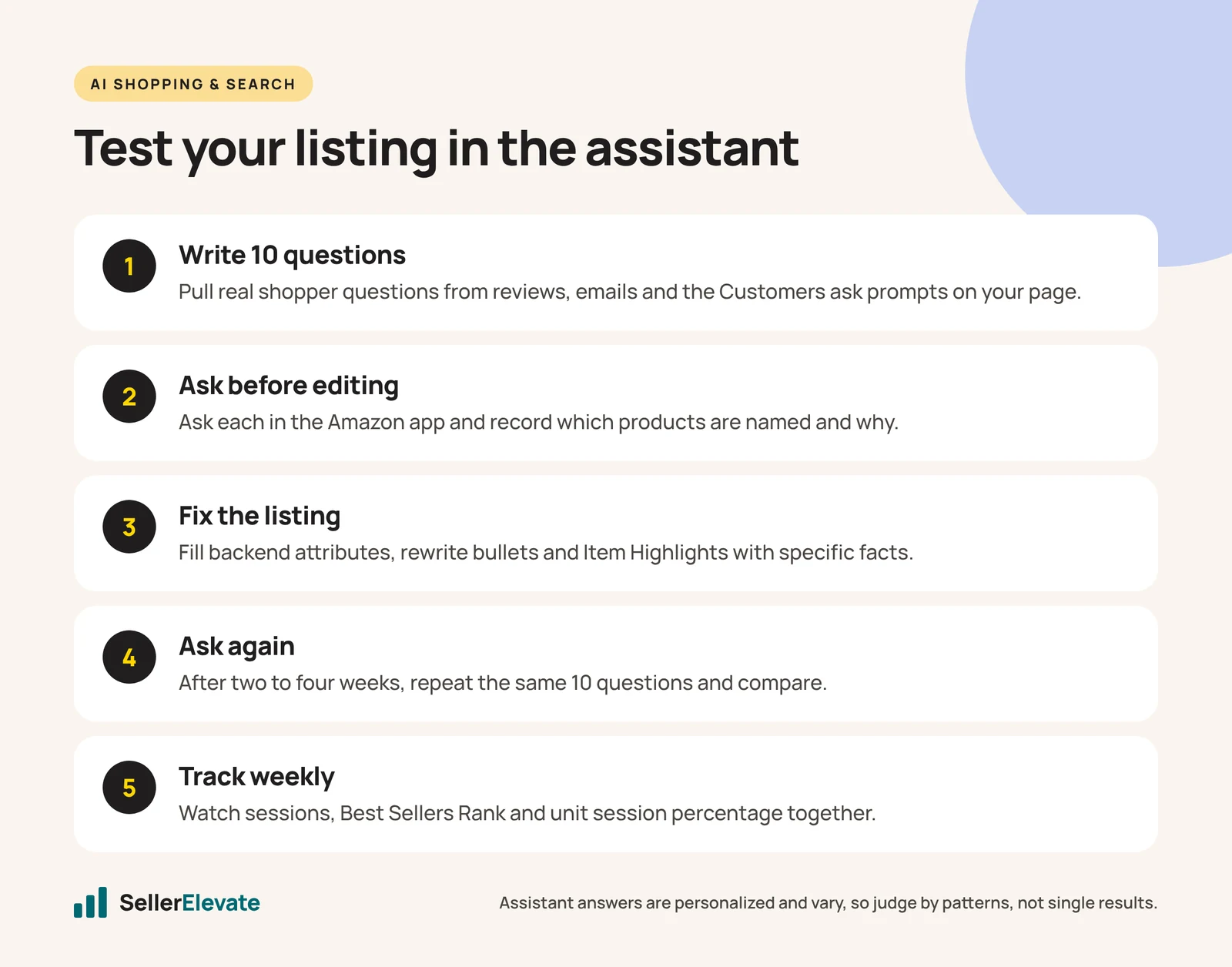
- Write down 10 real questions a shopper asks in your category. Pull them from your reviews, your customer emails and the “Customers ask” prompts that appear on your own detail page.
- Ask each one in the Amazon app, logged in as a shopper, before you change anything. Record which products are named and the reason given.
- Make your changes to attributes, bullets and Item Highlights.
- Wait two to four weeks, then ask the same 10 questions again. Assistant answers are personalized and vary, so look for a pattern, not a single result.
- Watch sessions and Best Sellers Rank together, weekly. A June 2026 analysis from Novadata calls falling sessions with a stable or improving BSR “the fingerprint of pre-answered traffic”. That is a single vendor’s view, but it is a reasonable signal that shoppers are getting answers before they reach your page.
- Compare unit session percentage before and after. If the assistant now sends you fewer but better-qualified shoppers, conversion should rise even if sessions do not.
What we'd do this week
With Prime Big Deal Days on October 6 and 7, 2026, and Black Friday close behind, we would not rewrite the whole catalog. We would do this:
- Pick your three highest-revenue ASINs.
- Run the 10-question test above on each, and screenshot the answers.
- Fill every empty backend attribute on those three. This is usually the quickest win.
- Rewrite the bullets so each one answers one question with a number.
- Check the title is under 75 characters and that you, not Amazon’s AI, wrote it.
- Re-run the test in two to four weeks and decide whether to roll the approach out to the rest of the catalog.
None of this replaces the basics. A listing still needs a strong main image, a fair price and enough reviews. Our ten-minute listing audit covers those. And a better listing makes advertising more efficient, not less: one client increased ad spend by 25% after a listing rebuild and saw net profit rise 81.5% from Q4 2024 to Q1 2025, which we wrote up in PPC is an amplifier, not a fix.
For background on the rename itself, read Rufus is gone: what Alexa for Shopping changes. If you would rather have someone do the rewrite, that is what our listing optimization work covers.
For the keyword groundwork under all of this, see how to do Amazon keyword research step by step.
Frequently asked questions
Is Rufus SEO different from normal Amazon SEO?
Partly. Classic search still matters for short queries, so keywords in the title and backend still count. The assistant adds a second test: can it explain why your product fits a specific question? That rewards plain facts about size, fit, materials and use cases over keyword density. In practice one well-written listing serves both.
Should I use ChatGPT to write my Amazon listing?
Use it to draft, not to decide what to say. ZonGuru's March 2026 analysis calls prompt-only copy the new keyword stuffing because it lacks competitive context, intent mapping and checkable facts. Research the questions shoppers ask and the facts you can stand behind first, then let AI help with wording.
Do reviews affect whether Alexa for Shopping recommends my product?
Amazon names customer reviews as one of the assistant's inputs, so recurring themes in reviews very likely shape what it says about you. How heavily they are weighed is not public. The practical step is to read your last 100 reviews for repeated complaints and fix the product or the expectation behind them.
How long does it take to see results after optimizing for Alexa for Shopping?
We re-run our 10-question test two to four weeks after changes. Assistant answers are personalized and vary, so look for a pattern across questions rather than one result. Track sessions, Best Sellers Rank and unit session percentage weekly alongside the test so you can see whether traffic quality improved.
Sources
- About Amazon: Amazon Rufus announcement, with rename notice (Feb 1, 2024)
- ZonGuru: ChatGPT for Amazon listings is the new keyword stuffing (Mar 10, 2026)
- SellerSprite: Amazon Alexa for Shopping listing optimization (Jun 18, 2026)
- Novadata: Rufus becomes Alexa for Shopping default in search (Jun 15, 2026)
- EcomCrew: Amazon will rewrite your product titles after July 27 (Jun 15, 2026)
- EcomCrew: Amazon retires Rufus and launches Alexa for Shopping (May 13, 2026)
Get the honest version of your numbers
A free account audit from the person who would actually run your account.