What is Amazon's Business Hour Delivery Rate and how do I avoid deactivation?
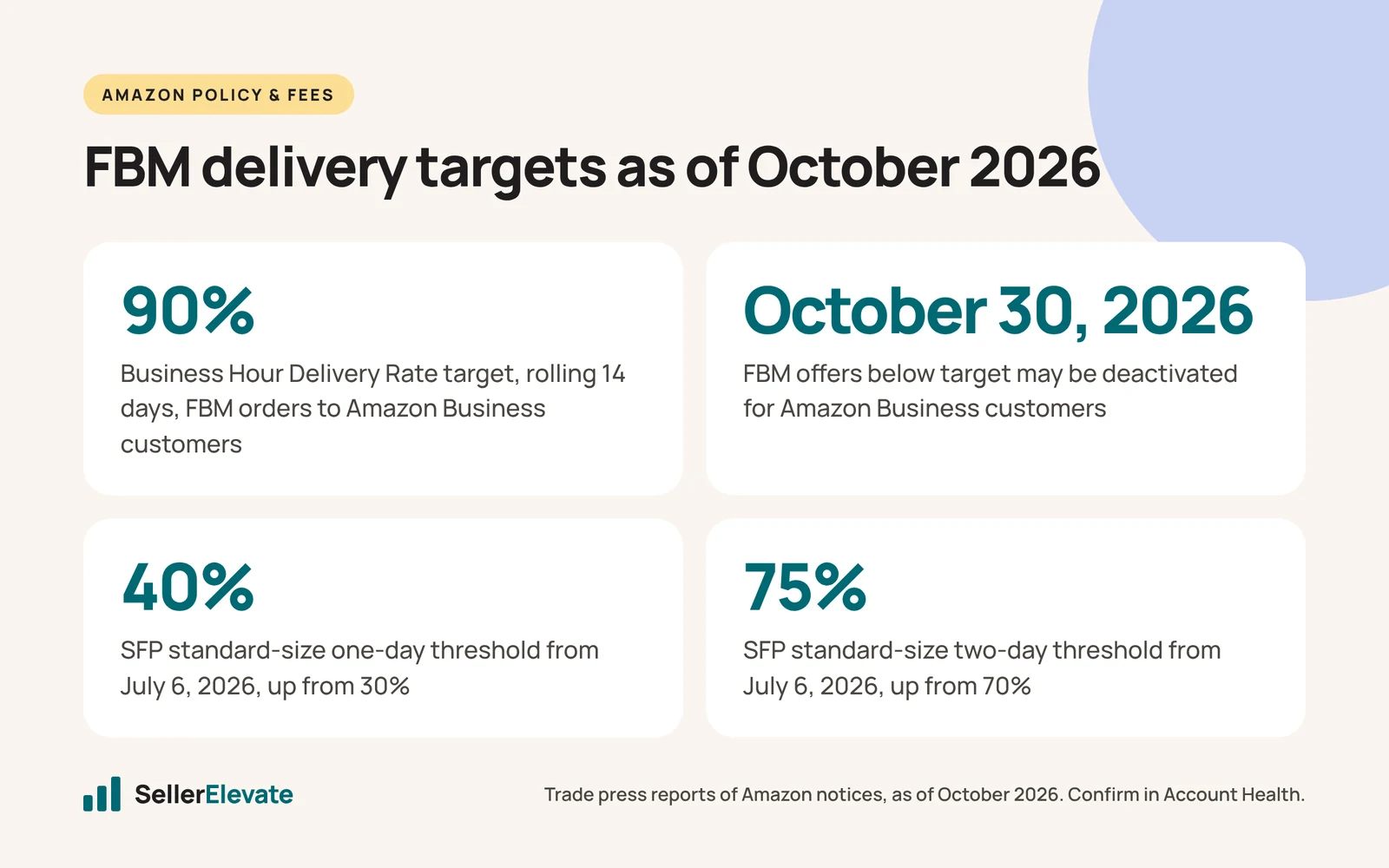
It is the share of your seller-fulfilled Amazon Business orders delivered during the buyer's operating hours, measured over a rolling 14 days. Amazon wants 90% or higher. Sellers below it on September 30, 2026 were warned, and from October 30 their FBM offers can be deactivated for Business customers. FBA offers are not affected.
Key takeaways
- Amazon's Business Hour Delivery Rate target is 90%, measured over a rolling 14 days on FBM orders to Amazon Business customers.
- Sellers still below 90% on October 30, 2026 can have FBM offers deactivated for Business customers, while FBA and retail eligibility stay unchanged.
- Amazon says using Automated Handling Time, Shipping Settings Automation and Amazon Buy Shipping together meets the requirement.
- Seller Fulfilled Prime standard-size thresholds rose on July 6, 2026: one-day from 30% to 40% and two-day from 70% to 75%.
- The weekend-order exclusion from SFP speed metrics ends on October 17, 2026, so weak weekend shipping will start to show.
Business Hour Delivery Rate is the share of your seller-fulfilled Amazon Business orders that arrive during the buyer’s stated operating hours, and Amazon now wants it at 90% or higher over a rolling 14 days. If you sat below 90% on September 30, 2026 you got a warning, and if you are still below it on October 30, Amazon can deactivate your FBM offers for Business customers.
That is the whole rule. It does not touch your FBA offers, and it does not touch your eligibility to sell FBM to ordinary retail shoppers. But for brands that ship their own orders and get real volume from offices, clinics, schools and warehouses, losing the Business audience four weeks before peak would hurt. And it lands in the same year Amazon raised the delivery speed bar for Seller Fulfilled Prime.
This post covers both, with a checklist for the next four weeks. Everything here is as of October 2026. Confirm the exact numbers on your own Account Health dashboard before acting.
What is Business Hour Delivery Rate, exactly?
The metric looks only at seller-fulfilled orders shipped to Amazon Business customers in the US store. For each order, the question is simple: did the package arrive while the buyer’s business was open? A box that lands at 7:40 pm at an office that closes at 5 pm counts as a miss, even if it arrived on the promised day.
Here is what the trade press reports, based on Amazon’s seller notifications:
| Item | Detail (as of October 2026) |
|---|---|
| Target | 90% or higher |
| Measurement window | Rolling 14 days |
| Effective date | September 30, 2026 (warnings sent to sellers below target) |
| Enforcement date | October 30, 2026 |
| Consequence | FBM offers may be deactivated for Amazon Business customers only |
| Not affected | FBA offers, and FBM eligibility for regular retail customers |
| Where to check | Eligibilities section of the Account Health dashboard |
beBOLD’s summary adds one useful detail from Amazon’s notice: Amazon says shipments that use Automated Handling Time, Shipping Settings Automation and Amazon Buy Shipping together will meet the requirement. That is a strong statement, and it is the main lever you control.
The same article names the real problem honestly: final delivery timing is often decided by the carrier, not the seller. You can hand a package over on time and still miss the window because the route put that ZIP code at the end of the driver’s day.
My Amazon Guy’s July report also ties this to earlier handling-time changes: new handling time defaults from July 15, 2026 and a move to automated handling time after September 1. Custom, handmade and bulky less-than-truckload shipments are exempt from the handling time requirements.
Why does a 14-day window matter so much?
A rolling 14-day window is short. For a brand shipping 20 Business orders a week, that is about 40 orders in the window, and four late-hour deliveries take you to 90%. Five take you under it.
So small numbers swing the rate. One carrier with a bad week, one regional weather event, or one batch of orders that went out on a slower service level can push you below the line. The upside is that the window also recovers quickly once you fix the cause. You do not need to wait a quarter for old misses to age out.
The practical point: do not read this metric once and move on. Check it every few days until October 30, and then weekly.
What changed for Seller Fulfilled Prime in 2026?
Separately, Amazon raised the delivery speed thresholds for Seller Fulfilled Prime from July 6, 2026. The thresholds are measured as a share of Prime customer page views where you can offer that delivery speed. Per My Amazon Guy’s May report, confirmed by AMZ Prep’s September roundup:
| Size tier | Speed | Before July 6, 2026 | From July 6, 2026 |
|---|---|---|---|
| Standard | One-day | 30% | 40% |
| Standard | Two-day | 70% | 75% |
| Standard | Five-day | 90% | 90% (unchanged) |
| Oversize | One-day | 10% | 15% |
| Oversize | Five-day | none | 80% (new) |
| Extra-large | Two-day | 15% | 25% |
| Extra-large | Five-day | none | 60% (new) |
Two dates matter right now. First, weekend orders have been excluded from the speed calculations as an adjustment period, and that exclusion ends on October 17, 2026. If your weekend shipping is weak, your numbers will look worse from that date, right as Q4 volume builds. Second, Amazon said a ZIP-level delivery promise tool would arrive in September 2026, letting sellers set cut-off times, weekend shipping and local delivery data by ZIP code. Reports we found in August still described it as not yet available, so check whether it is live in your account.
The other SFP requirements did not change. AMZ Prep’s August roundup notes that SFP still requires weekend fulfillment and roughly 93.5% on-time delivery, with weekly performance reviews.
Losing the Prime badge on an FBM offer costs more than the badge. As we covered in delivery speed as a ranking lever, the delivery promise shown on the page affects conversion and placement, so a slower promise tends to show up in sales before it shows up in any warning.
How do the two rules interact?
They pull in slightly different directions, and that is the trap.
SFP rewards speed: get it there in one or two days to as much of the country as possible. Business Hour Delivery Rate rewards timing: get it there while the office is open. A cheaper ground service that arrives on day two at 8 pm can help your SFP numbers and still hurt your Business rate.
For most brands the answer is the same tool set Amazon recommends: let Amazon set handling time automatically, let shipping settings automation set the delivery promise, and buy labels through Amazon Buy Shipping so the carrier promise and the Amazon promise match.
If your FBM business is mostly Business buyers and you cannot get the rate up, there is another option: move the SKUs that sell to Business customers into FBA. FBA offers are not affected by this metric. That has its own cost, especially in Q4, and our post on whether AWD is worth it in 2026 walks through how the storage side of that math changed this year.
What we'd do before October 30
This is the checklist we are running for FBM clients this month:
- Pull your current rate. Open Account Health, go to the Eligibilities section, and write down your Business Hour Delivery Rate today. If you never got a warning, check anyway. Note how many Business orders sit in the 14-day window so you know how sensitive the number is.
- Find the misses. Export the Business orders from the last 14 days and sort the late-hour deliveries by carrier, service level and destination region. Misses usually cluster. One carrier or one service level is often most of the problem.
- Turn on all three Amazon tools. Automated Handling Time, Shipping Settings Automation and Amazon Buy Shipping. Amazon says using all three together meets the requirement. If you are not using them, that is the first fix, not the last.
- Change service level for Business addresses. Where a carrier keeps delivering after hours, pick a service with an earlier delivery commitment for Business orders, even if it costs more per label. Compare that extra cost to the margin on the Business revenue you would lose.
- Tighten your own cut-off. Packages that leave late in the day arrive late in the day. Move your daily carrier pickup earlier or add a second pickup if volume allows.
- Check SFP before October 17. Look at your speed metrics with weekends included in mind. If your weekend shipping is thin, staff it or adjust your weekend settings before the exclusion ends.
- Check for the ZIP-level tool. If it is live in your account, set your real cut-off times and weekend capacity by region. A precise promise you can keep beats an optimistic one you miss.
- Decide on fallbacks for your top Business SKUs. If a SKU earns most of its sales from Business buyers and the rate will not get above 90% in time, consider sending some stock to FBA as cover. Check your FBA capacity first, because Q4 limits are tight; see our FBA capacity limits post.
What we would not do
We would not try to game the metric by restricting Business buyers or by hiding Business pricing. You lose the Business revenue either way, and the problem underneath, packages arriving after hours, is still there.
We would also not assume a warning means nothing until October 30. The window is rolling, so whatever happens in the last two weeks of October is what Amazon will see.
If you would rather have someone look at your account health and fulfillment settings with you, our account management team does this as part of regular reviews, and we will tell you plainly whether FBM still makes sense for your Business-heavy SKUs.
Frequently asked questions
Does the Business Hour Delivery Rate apply to FBA orders?
No. It applies only to seller-fulfilled orders shipped to Amazon Business customers in the US store. FBA offers are not measured, and your eligibility to sell FBM to regular retail customers is not affected. That is why moving Business-heavy SKUs into FBA is one fallback for sellers who cannot reach 90% in time.
Where do I check my Business Hour Delivery Rate?
Check it in the Eligibilities section of the Account Health dashboard in Seller Central. Because the measurement window is a rolling 14 days, the number can move quickly in either direction. Check it every few days until October 30, 2026, and note how many Business orders sit in the window so you know how sensitive it is.
What are the new Seller Fulfilled Prime speed thresholds?
From July 6, 2026, standard-size products need one-day delivery on 40% of Prime page views, up from 30%, and two-day on 75%, up from 70%. Five-day stays at 90%. Oversize one-day rose from 10% to 15% with a new 80% five-day requirement, and extra-large two-day rose from 15% to 25%.
What happens to SFP on October 17, 2026?
Weekend orders have been excluded from SFP speed calculations as an adjustment period, and that exclusion ends on October 17, 2026. From then on, weekend orders count. If your weekend shipping is limited, your speed numbers will likely look worse just as Q4 volume builds, so review weekend capacity and settings before that date.
Sources
- beBOLD Digital: Amazon introduces 90% Business Hour Delivery Rate for FBM (Sep 15, 2026)
- My Amazon Guy: Amazon Business Hour Delivery Rate sets a new standard for sellers (Jul 3, 2026)
- My Amazon Guy: Amazon tightens Seller Fulfilled Prime delivery speed (May 29, 2026)
- AMZ Prep: Amazon August 2026 updates (Sep 4, 2026)
- SellerSprite: Amazon Seller Fulfilled Prime 2026 speed rules (Aug 1, 2026)
Get the honest version of your numbers
A free account audit from the person who would actually run your account.