What are Amazon Sponsored Prompts and are they worth paying for?
Sponsored Prompts are AI-written questions and answers about your product or brand that appear in Alexa for Shopping, formerly Rufus, and on Amazon pages. They have been billed per click since March 25, 2026, and US campaigns are enrolled automatically. Judge them by your own Prompts report, not Amazon's self-reported 48% conversion claim.
Key takeaways
- Sponsored Prompts became generally available and billable in the US on March 25, 2026, after a free beta that began November 11, 2025.
- Eligible US Sponsored Products and Sponsored Brands campaigns were enrolled automatically, and clicks use the parent campaign's CPC.
- Amazon writes the prompts and answers; advertisers can only pause the ones they do not like.
- Amazon's claim that prompt clickers convert 48% more often is self-reported, with no published methodology.
- Find prompt performance under Campaign, Ad Group, Ads, then the Prompts tab, and judge it against the rest of the ad group.
Amazon Sponsored Prompts are AI-generated questions and answers about your product or brand that appear inside Amazon’s shopping assistant, Alexa for Shopping (formerly Rufus), and on search and detail pages, charged per click as part of your existing Sponsored Products and Sponsored Brands campaigns. Whether they are worth paying for depends on your own Prompts report, not on Amazon’s headline claim, and since US campaigns are enrolled automatically, many sellers are already paying for them without having looked.
Here is how they work, where to find them, and a simple test to decide whether to keep them on.
What are Sponsored Prompts?
Amazon announced prompts on November 11, 2025, as a free open beta. Amazon’s launch page describes them as an “AI-powered enhancement to your existing campaigns that automatically engages shoppers with relevant product information”. They are built from “Amazon’s first-party signals from your detail pages, Brand Store, campaign data, and more”.
In practice, a prompt is a suggested question with a short “sponsored” label. Examples reported by agencies include “Which Samsung TVs are good for gaming?” and, from a leaked Amazon pitch deck covered by Shopifreaks, branded formats like “Why choose [brand] shirt?”. When a shopper taps it, they get an expanded answer on the page or a conversation in the assistant.
There are two types:
| Sponsored Products prompts | Sponsored Brands prompts | |
|---|---|---|
| Tied to | A specific ASIN in an SP campaign | Your brand, from an SB campaign |
| Typical question | A feature or use of one product | Why choose this brand, or a category question |
| Bid | Uses the parent campaign’s CPC, no separate bid | Uses the parent campaign’s CPC, no separate bid |
| Who writes the prompt | Amazon’s AI | Amazon’s AI |
| Availability | US only, excludes authors and publishers | US only, excludes authors and publishers |
The last row is the important one for brand control. You cannot write the prompt or the answer. You can only pause the ones you do not like.
When did they start costing money?
According to PPC Land, Amazon announced on March 10, 2026 that prompts would leave beta, and they became generally available and billable on March 25, 2026. Amazon’s launch page confirms general availability in the US on that date. EcomCrew reports the same date.
All eligible US advertisers were enrolled automatically, with no setup. Clicks are charged within your existing CPC bidding, so a click on a prompt costs the same as a click on the ad it belongs to. There is no separate budget line, which is why prompts are easy to miss: the spend shows up inside campaigns you already run.
These details are as of October 2026. Confirm the current terms in your Amazon Ads console before acting.
Are Sponsored Prompts worth paying for?
Amazon’s case rests on a self-reported claim: shoppers who click a sponsored prompt convert 48% more often and spend 21% more than shoppers who do not. Relevant Audience pointed out in August 2026 that Amazon published no methodology, sample size, time window or independent check for those numbers.
There is also an obvious selection effect. A shopper who taps a question about your product is already further along than one who taps nothing. Comparing the two tells you little about what the prompt itself caused.
So treat the 48% as marketing. What matters is the cost per order and ACoS in your own Prompts report, compared with the rest of the same campaign.
Reasons prompts can make sense:
- The shopper is asking a question about your product, which is a high-intent moment.
- On a compressed answer of a handful of products, a paid spot may be the only way into a conversation you are not winning organically.
- You pay per click, not per impression, so a prompt nobody taps costs nothing.
Reasons for caution:
- You cannot control the wording, and an AI-written answer can misdescribe your product.
- Spend is mixed into campaigns you already run, so it can quietly lift ACoS.
- Early reports in late 2025 found very little data in most Prompts tabs, so many accounts still have small samples.
How do you find Sponsored Prompts in your reports?
There are two places to look.
The Prompts tab. In the Ads Console, go to Campaign, then Ad Group, then Ads, then the Prompts tab. Only prompts with at least one click appear. For each one you see impressions, clicks, click-through rate, cost per click, spend, sales, ACoS, ROAS, and 7-day orders and units.
The Prompts report and API. PPC Land and Amazon both describe a dedicated Prompts report with the same metrics, also available through the API. That is the easier route if you manage many campaigns.
On switching them off, sources disagree. Amazon’s page says you can pause a prompt at any time. Adbrew (May 2026) describes control as per prompt, not all or nothing. Intentwise (November 2025) said prompts could be disabled entirely but not per campaign. Check what your own console offers today, because this has been changing since the beta.
A four-week test plan
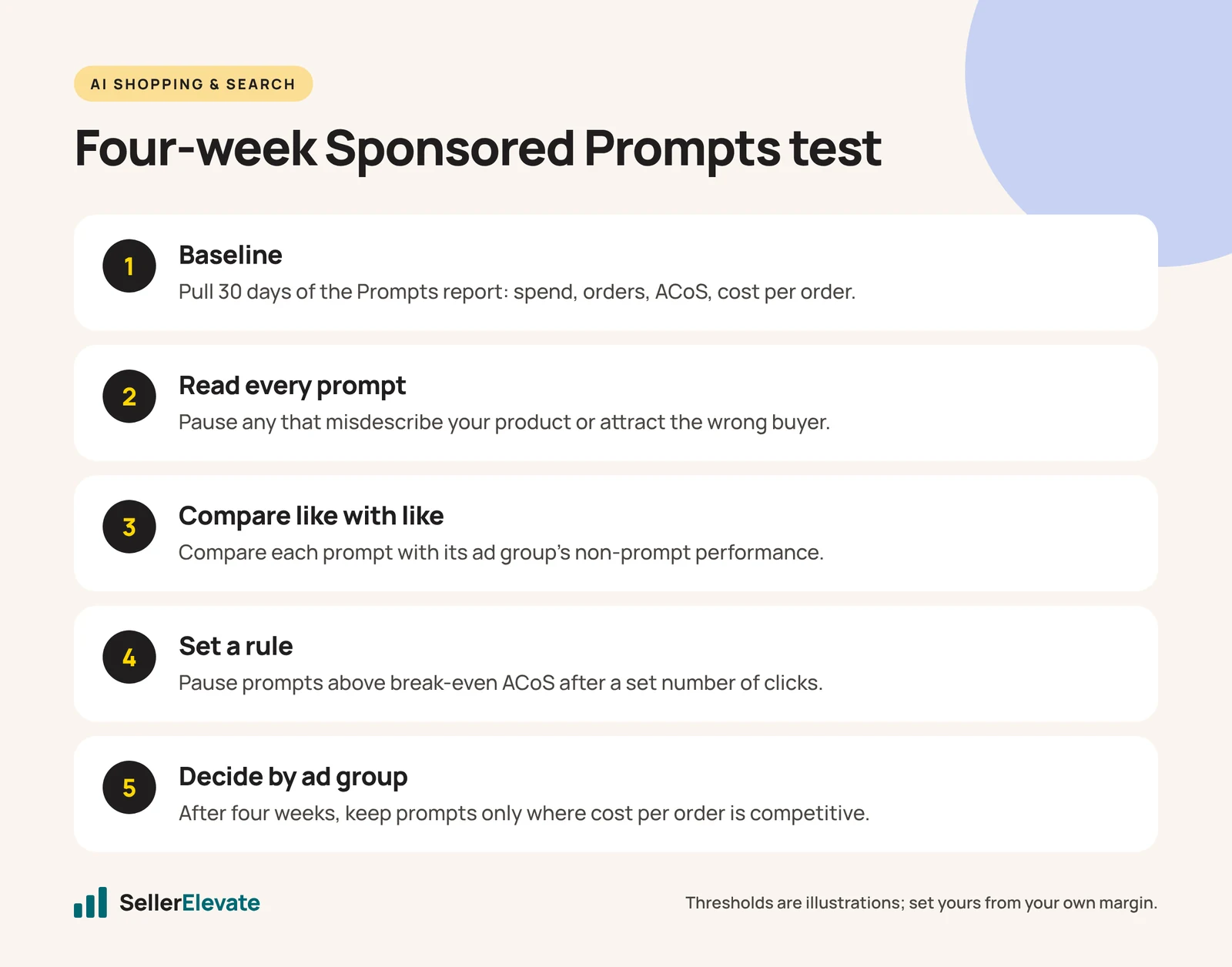
Here is the test we run before deciding whether prompts stay on for a client:
- Baseline. Pull the last 30 days of the Prompts report for every campaign. Note spend, orders, ACoS and cost per order per prompt.
- Read every prompt and its answer. Pause any that describe your product inaccurately, make claims you cannot support, or attract the wrong buyer. Accuracy comes before performance.
- Compare like with like. For each ad group, compare the prompt’s ACoS and cost per order with the ad group’s non-prompt performance over the same period.
- Set a rule. For example, for a hypothetical $30 product with a 35% margin, break-even ACoS is 35%. Pause any prompt that has spent more than one break-even order’s worth of cost (about $10.50 here) with no sale, or that sits above 35% ACoS after 20 clicks.
- Run for four weeks, checking weekly. Prompts depend on assistant traffic, which spikes around events such as Prime Big Deal Days on October 6 and 7, 2026, so do not judge on the event week alone.
- Decide by ad group. Keep prompts where cost per order is at or below the rest of the ad group. Pause them where it is not.
The thresholds above are illustrations. Set yours from your own margin.
What we'd do this week
If you sell in the US and run Sponsored Products or Sponsored Brands, prompts are probably already live in your account.
- Open the Prompts tab on your three highest-spend campaigns today.
- Read every prompt with a click and pause any that are wrong about your product.
- Add prompt spend to your weekly ACoS review so it is not hidden inside campaign totals.
- Before Black Friday, decide which ad groups keep prompts on based on four weeks of your own data, not Amazon’s 48%.
The organic side matters just as much. The assistant builds prompts from your detail page and Brand Store, so a vague listing produces vague prompts. Our guide on how to optimize a listing for Alexa for Shopping covers that, and Rufus is gone: what Alexa for Shopping changes explains the wider shift.
Prompts are automation you did not switch on, so they need the same supervision as any other automated spend. On one SKU we manage, $358K of ad spend ran at 4.00 ROAS with TACoS under 10%, with software doing the repetitive work and a person reading the reports every week. We explain that division of labor in we automated Amazon PPC. If you want help setting this up, that is part of our Amazon PPC management.
Frequently asked questions
Do I need to set up Sponsored Prompts?
No. Amazon enrolled eligible US Sponsored Products and Sponsored Brands campaigns automatically, with no setup and no separate bid. If you run those campaigns in the US, prompts may already be live. Check the Prompts tab in your Ads Console to see whether any have received clicks.
How much do Sponsored Prompts cost?
There is no separate price. Clicks on a prompt are charged within your existing CPC bidding, so a prompt click costs the same as a click on the ad it belongs to. The spend appears inside campaigns you already run, which is why it is easy to miss in a weekly review.
Can I write my own Sponsored Prompts?
No. Amazon's AI generates the prompts and answers from your detail pages, Brand Store and campaign data. You can review them and pause any that are inaccurate. The best way to influence what they say is to make your listing and Brand Store clear and specific.
Are Sponsored Prompts available outside the US?
As of October 2026, Amazon's launch page lists Sponsored Products and Sponsored Brands prompts as available in the United States only, and excludes authors and publishers. Check your Ads Console for your marketplace before planning around them, since availability can expand without much notice.
Sources
- Amazon Ads: Sponsored Products and Sponsored Brands prompts launch (Nov 2025, updated Mar 2026)
- PPC Land: Amazon’s AI shopping prompts are now billable (Mar 28, 2026)
- Shopifreaks: Amazon reveals pricing and measurement details for ads inside Rufus (Apr 1, 2026)
- Relevant Audience: Amazon Ads Q2 2026 and Sponsored Prompts (Aug 3, 2026)
- Adbrew: Amazon Sponsored Products and Brands AI prompts (May 4, 2026)
- Intentwise: Sponsored Prompts ads on Amazon explained (Nov 30, 2025)
- EcomCrew: Amazon retires Rufus and launches Alexa for Shopping (May 13, 2026)
Get the honest version of your numbers
A free account audit from the person who would actually run your account.